
Chrome 148 ships an origin trial for something web developers have wanted for years: a way to render actual DOM elements into a <canvas> using the browser's own layout engine. Before diving into what makes it special, it helps to understand why every existing approach to "take a screenshot of this HTML" is fundamentally compromised.
The Problem: Rendering HTML Is Hard
Taking a screenshot of a DOM element sounds trivial — the browser already painted it, just give it to me. But browsers have never exposed that painted output as pixels you can manipulate. Every library that tries to do this has had to work around the gap, and every workaround leaks.
Existing Approaches
html2canvas
html2canvas is the most widely used library for this problem. Its approach: re-implement the CSS rendering pipeline in JavaScript. It walks the DOM, reads computed styles, and draws each element onto a canvas manually — rectangles, text, borders, shadows, all redrawn from scratch.
The implementation detail that matters is that it is not using the browser's renderer. It is using a JavaScript approximation of it. This leads to a long list of known breakage:
- CSS Grid and Flexbox layouts are partially supported at best
- mix-blend-mode, filter, backdrop-filter are unreliable
- CSS custom properties work only where the library explicitly resolves them
- Web fonts sometimes don't load in time; the fallback gets captured instead
- SVG rendering is inconsistent across browsers
- Pseudo-elements (::before, ::after) render incorrectly or not at all
- position: fixed elements appear at wrong positions
- overflow: hidden clipping is sometimes missed
Performance is also a concern: for a complex page, html2canvas does a full synchronous DOM read and canvas repaint. On a rich UI, this can take hundreds of milliseconds on the main thread.
Cross-origin images are the other shoe to drop. If any <img> on the element loads from a different origin without a crossOrigin attribute and a CORS response(which is often the case in modern websites), the canvas becomes tainted — toDataURL() and getImageData() throw a SecurityError. You either add CORS headers on every asset server, or you proxy all images, or you accept that some screenshots will be broken silently.
SVG foreignObject (dom-to-image, html-to-image)
A cleverer approach: serialize the element and its styles to a string, embed it inside an SVG <foreignObject>, then draw the SVG to canvas via an <img>. This is what dom-to-image, dom-to-image-more, and html-to-image all do under the hood.
const svg = `<svg xmlns="http://www.w3.org/2000/svg" width="${width}" height="${height}">
  <foreignObject width="100%" height="100%">
    ${serializedHtml}
  </foreignObject>
</svg>`;
const img = new Image();
img.src = 'data:image/svg+xml,' + encodeURIComponent(svg);
ctx.drawImage(img, 0, 0);
This hands the rendering back to the browser — the SVG renderer calls the HTML layout engine for the <foreignObject> content. Fidelity is meaningfully better than html2canvas for most CSS, because you're using actual browser layout rather than a JavaScript reimplementation.
But the security model kills you just as hard. SVG images drawn to canvas taint it. External resources inside the <foreignObject> — web fonts loaded from a CDN, images from a different domain — cause the canvas to be marked tainted the moment you draw the SVG. The workaround is to inline everything: fetch fonts and convert to base64 data URIs, fetch images and inline them, recursively inline <link> stylesheets. Libraries like html-to-image do exactly this, which is why their screenshots work better than dom-to-image's but take longer and still miss edge cases.
There's also a harder limitation: <foreignObject> rendering is undefined behavior in the SVG spec. Chrome, Firefox, and Safari all handle it differently. Scripts don't run inside it. Iframes are blank. :hover and focus states can't be captured.
chrome.tabs.captureVisibleTab
The Chrome Extension API captureVisibleTab takes an actual GPU-composited screenshot of the visible viewport. Fidelity is perfect — it's the same pixels the user sees. No taint, no CSS gaps, no font timing issues, no CORS issues.
chrome.tabs.captureVisibleTab(null, { format: "png" }, (dataUrl) => {
  // pixel-perfect screenshot of the visible tab
});
The constraints are significant though. It captures the whole viewport, not an element. You get a flat PNG with no compositing control. It's only available to browser extensions. It can't capture off-screen content, content below the fold, or background tabs. You have no ability to manipulate the rendered output programmatically — no texture mapping, no 3D, no dynamic compositing.
getDisplayMedia (the Screen Capture API) has similar fidelity characteristics but requires a user gesture and a permission prompt, making it unsuitable for anything that needs to run silently.
Puppeteer / Headless Chrome
Outside the browser entirely, Puppeteer's page.screenshot() or element.screenshot() is the gold standard for fidelity. It spins up a real Chrome renderer, navigates to your page, and captures it. Pixel-perfect, full CSS support, custom fonts, everything.
But this is a server-side tool. It can't run in a user's browser. It's the right answer for server-rendered OG images and PDF generation; it's not an option for an in-page screenshot feature.
HTML in Canvas (Origin Trial, Chrome 148+)
The new API takes a fundamentally different approach: it gives same-page JavaScript direct access to the browser's composited output for a DOM element, rendered into a canvas or GPU texture.
Setup
The canvas needs a layoutsubtree attribute. This tells the browser that this canvas will host DOM subtree rendering, which affects how layout and paint are scheduled:
<canvas id="c" layoutsubtree></canvas>Rendering to 2D Canvas
const canvas = document.getElementById('c');
const ctx = canvas.getContext('2d');
const element = document.getElementById('my-widget');

// Renders the element's current painted state into the canvas
const transform = ctx.drawElementImage(element, 0, 0);
drawElementImage returns a transform object that describes where in canvas space the element landed, which you need to handle things like CSS transforms on the source element.
Rendering to WebGL Texture
gl.texElementImage2D(
  gl.TEXTURE_2D, 0,
  gl.RGBA, gl.RGBA, gl.UNSIGNED_BYTE,
  element
);
This uploads the element's rendered output directly as a GPU texture — zero copies, no round-trip through a PNG blob.
Rendering to WebGPU Texture
device.queue.copyElementImageToTexture(element, { texture: targetTexture });Same idea for WebGPU, enabling element rendering as input to compute shaders or render pipelines.
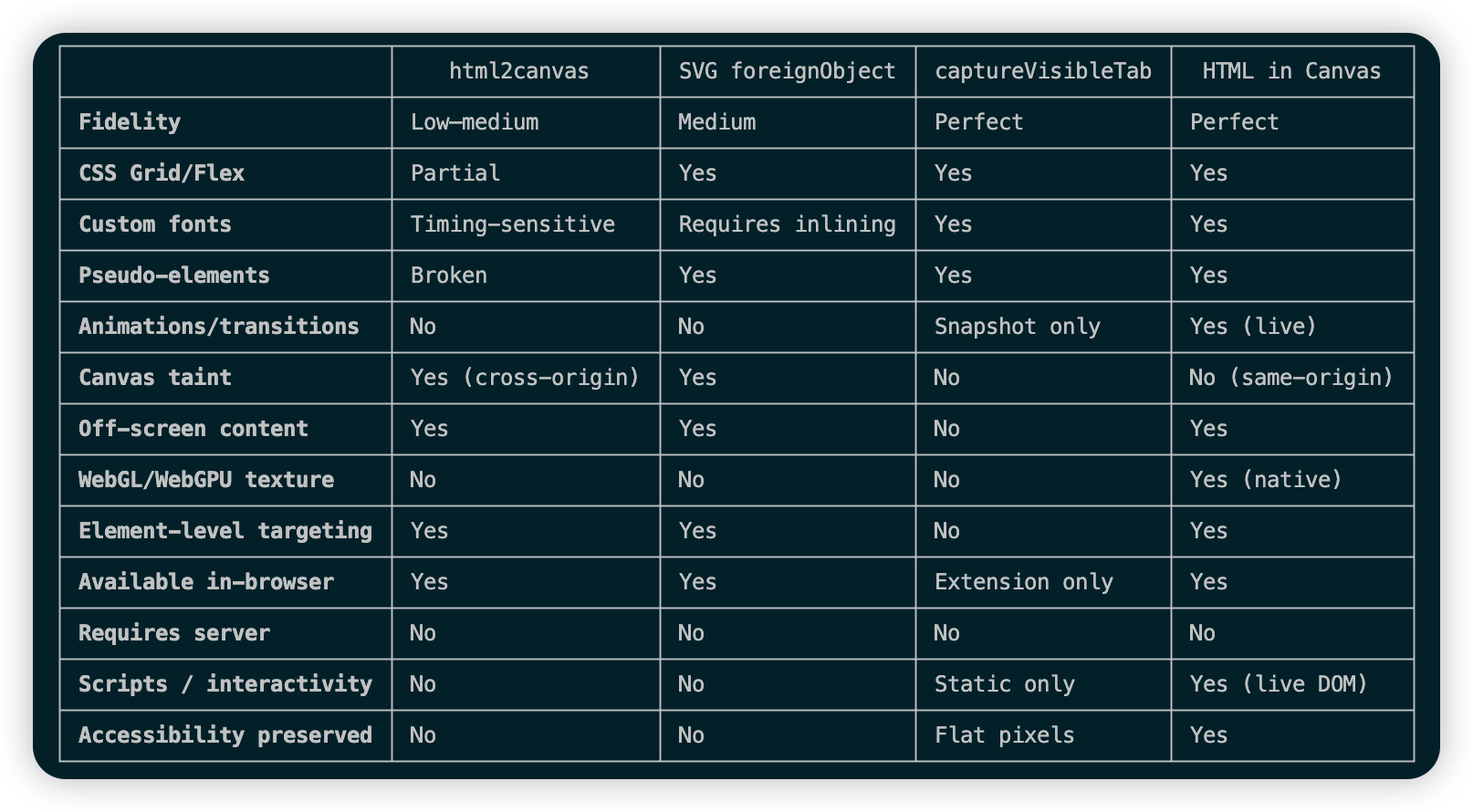
Comparison: Screenshot Use Case
Fidelity
This is the biggest win. html2canvas and the SVG foreignObject approach both approximate the browser's output with varying degrees of accuracy. HTML in Canvas uses the actual rendered output — the same pixels the compositor produced. Complex layouts, backdrop-filter, clip-path, CSS Grid subgrid, custom properties, all of it works because nothing is being reimplemented.
Canvas Taint
The security restriction that breaks most canvas-based screenshot libraries is gone for same-origin content. drawElementImage on a same-origin element does not taint the canvas, so toDataURL() and getImageData() work normally. Cross-origin iframes are still blocked — that's a deliberate security boundary, not a limitation of the implementation.
Live vs. Snapshot
The SVG foreignObject trick gives you a snapshot — HTML rendered into a static image at a point in time. HTML in Canvas integrates with the browser's paint lifecycle via paint events, so the canvas reflects ongoing changes. This makes it viable for things like rendering a live UI element as a texture in a 3D scene, not just one-shot screenshots.
WebGL/WebGPU Integration
This is where the API goes beyond screenshot territory entirely. texElementImage2D and copyElementImageToTexture enable DOM content as a GPU texture with no intermediate PNG encoding or blob conversion. For use cases like rendering a UI panel on a 3D surface in a game engine, or using HTML as a texture in a WebGPU render pass, this is zero-overhead compared to any prior approach.
What It Doesn't Replace
The cross-origin limitation means captureVisibleTab is still the right tool in extension contexts where you need to screenshot third-party content. Puppeteer is still the right tool for server-side rendering at scale. And for browsers other than Chrome, none of the native advantages apply yet — html2canvas or the SVG approach remains the only cross-browser option for the foreseeable future.
Current Status
The API is in origin trial from Chrome 148 through 150. To test it today without registering for the trial, enable chrome://flags/#canvas-draw-element in Chrome Canary 149+.
Three.js already has an integration (THREE.HTMLTexture) and PlayCanvas supports it through their texture API. This suggests the ecosystem is moving quickly around the WebGL/WebGPU texture use cases specifically.
For the screenshot use case, the path forward is clear: detect support, use drawElementImage when available, fall back to the SVG foreignObject approach for other browsers. The gap in fidelity between the two paths will be noticeable, but at least the primary path will be correct.

No comment for this article.