
มีคำถามมากมาย(คำถามที่ 1, คำถามที่ 2) บน Stackoverflow เกี่ยวกับวิธีการแปลง JKS keystore เป็น BKS keystore(รูปแบบ keystore ที่จัดเตรียมโดย BouncyCastle) โดยใช้ Java keytool.
เหตุผลที่การแปลงนี้มีคำถามมากมายก็คือ BKS ไม่ใช่รูปแบบ keystore ที่ Java SE รองรับ เป็นรูปแบบ keystore ของบุคคลที่สาม การแปลง JSK เป็น BKS ผู้ให้บริการ BKS จะต้อง ดาวน์โหลดก่อน และต้องเพิ่มตัวเลือกอีกสองสามตัวเลือกเมื่อเรียกใช้คำสั่ง keytool
คำสั่งทั่วไปในการแปลง JKS keystore เป็น BKS keystore ควรมีลักษณะดังนี้:
keytool -importkeystore -srckeystore testkeys -srcstoretype JKS -srcstorepass passphrase -destkeystore testkeys.bks -deststoretype BKS -deststorepass password -provider org.bouncycastle.jce.provider.BouncyCastleProvider -providerpath [PARENT_DIRECTORY_PATH]\bouncycastle\bcprov-jdk15on-152.jar
ตัวเลือกที่สำคัญสองตัวเลือกคือ -provider และ -providerpath. ตัวเลือก -provider บอก JVM ว่าบริการ BKS keystore ลงทะเบียนไว้ที่ใด และ -providerpath บอก JVM ว่าสามารถค้นหาผู้ให้บริการได้ที่ใด
ด้วยวิธีนี้ ไม่ควรมีปัญหาในการแปลง JKS keystore เป็น BKS keystore ตัวอย่างหนึ่งแสดงไว้ด้านล่าง
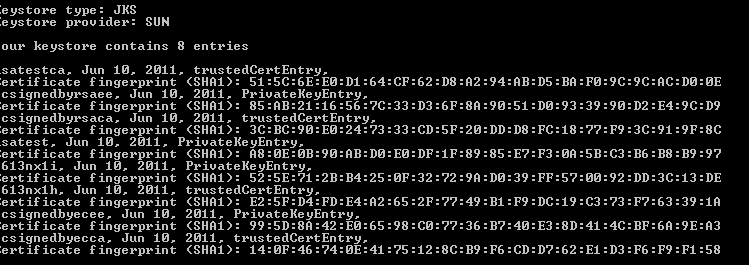
ก่อนการแปลง JKS keystore ประกอบด้วยรายการด้านล่าง:
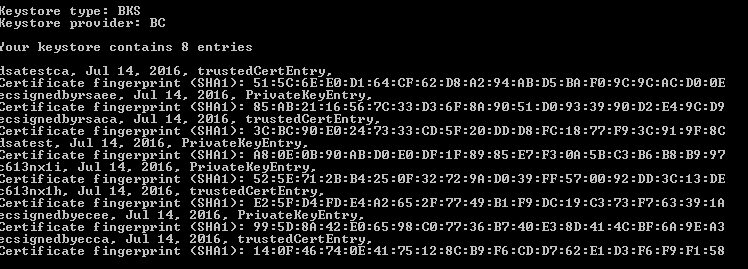
หลังจากการแปลง BKS keystore ประกอบด้วยรายการด้านล่าง:
คำสั่งควรจะคล้ายกันหากคุณต้องการแปลงระหว่างรูปแบบ keystore ที่แตกต่างกัน

Problem importing entry for alias capistore: java.security.KeyStoreException: java.io.IOException: Error initialising store of key store: java.security.InvalidKeyException: Illegal key size.
I keep getting the above error, any help would be appriciated