
There are lots of questions(question 1, question 2) on Stackoverflow about how to convert JKS keystore to BKS keystore(a keystore format provided by BouncyCastle) using Java keytool.
The reason why this conversion gets lots of questions is that BKS is not a keystore format supported by Java SE, it's a third party keystore format. To convert JSK to BKS, the BKS provider has to be downloaded first. And a few more options needs to be added when running the keytool command.
The typical command to convert JKS keystore to BKS keystore should look like below :
keytool -importkeystore -srckeystore testkeys -srcstoretype JKS -srcstorepass passphrase -destkeystore testkeys.bks -deststoretype BKS -deststorepass password -provider org.bouncycastle.jce.provider.BouncyCastleProvider -providerpath [PARENT_DIRECTORY_PATH]\bouncycastle\bcprov-jdk15on-152.jar
The two important options are -provider and -providerpath. The -provider option tells the JVM where the BKS keystore service is registered and -providerpath tells the JVM where the provider can be located.
With this, there should be no problem to convert JKS keystore to BKS keystore. One example is shown below.
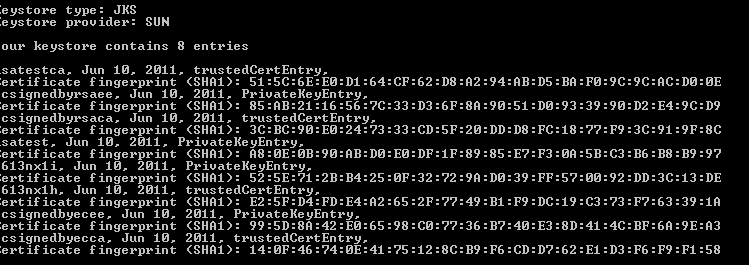
Before conversion, the JKS keystore contains below entries :
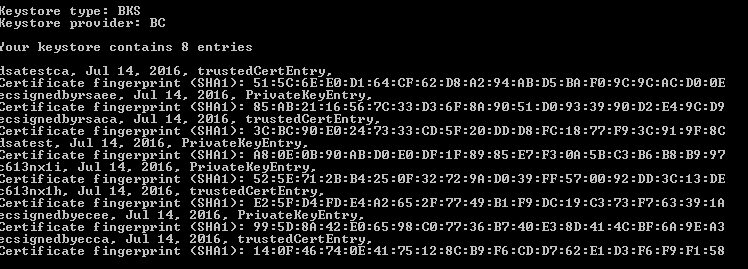
After the conversion, the BKS keystore contains below entries :
The command should be similar if you want to convert between different keystore formats.

Problem importing entry for alias capistore: java.security.KeyStoreException: java.io.IOException: Error initialising store of key store: java.security.InvalidKeyException: Illegal key size.
I keep getting the above error, any help would be appriciated