
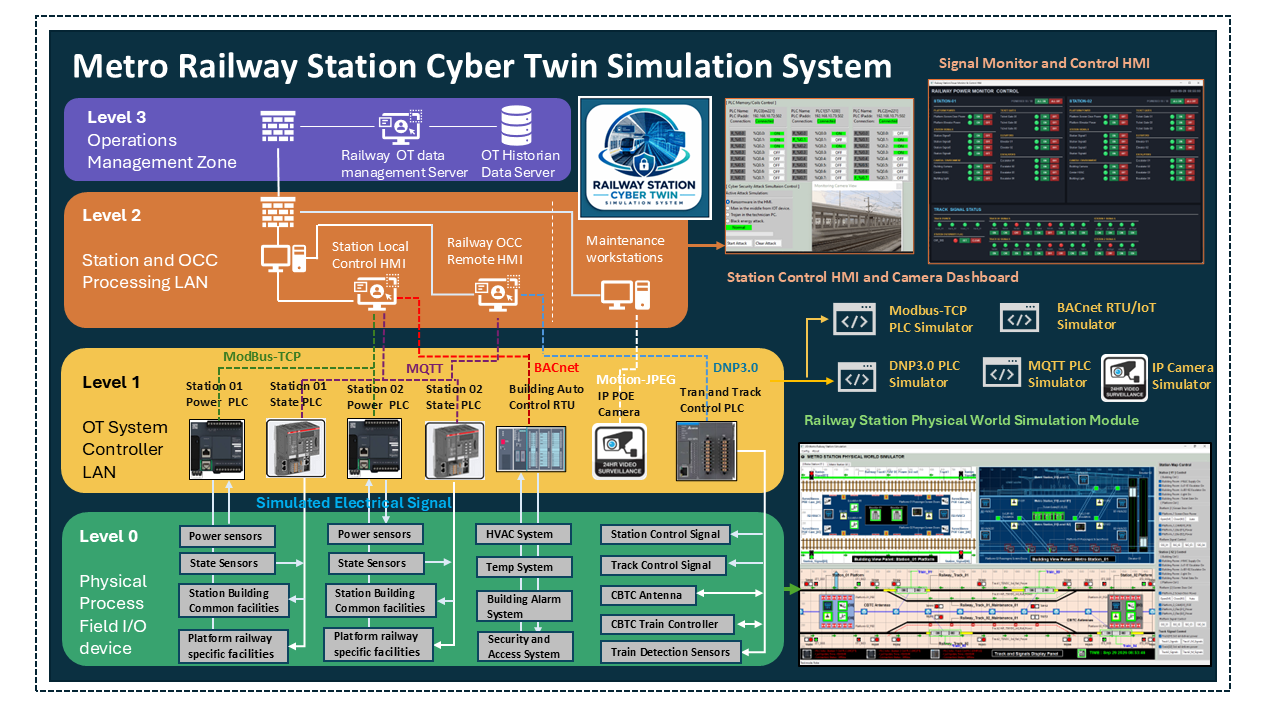
Project Design Purpose : The Railway Station Cyber Twin Simulation System is a software-based Operational Technology simulation platform designed to address OT cybersecurity challenges in two critical infrastructure sectors: public transportation and CI building management. The platform integrates three SCADA systems: the Communication-Based Train Control (CBTC) signalling system, the Station Building Management System (BMS), and the Railway Platform Management System. Designed according to the ISA-95/IEC-62264 industrial automation architecture, the cyber twin models OT environments from Level 0 to Level 3 to represent the interactions between physical processes, control systems, station operations, and enterprise-level management. It provides a realistic and controlled environment for investigating potential OT cyber threats, evaluating their impact on railway operations, and supporting cybersecurity testing, training, and cyber exercises.
# Author:      Yuancheng Liu
# Created:     2026/10/14
# Version:     v_0.0.1
# Copyright:   Copyright (c) 2026 Liu Yuancheng
# License:     GNU General Public License V3
1. Project Introduction
The Railway Station Cyber Twin System is a software-based OT simulation platform designed to model the operations of two nearly metro railway stations and the railway tracks connecting them. The system integrates railway signalling, train control, station building automation and platform management into a unified cyber twin environment. Developed for cybersecurity exercises, technical training, security research, and educational purposes, the platform provides a realistic and interactive representation of metro railway infrastructure and its associated Supervisory Control and Data Acquisition (SCADA) systems.
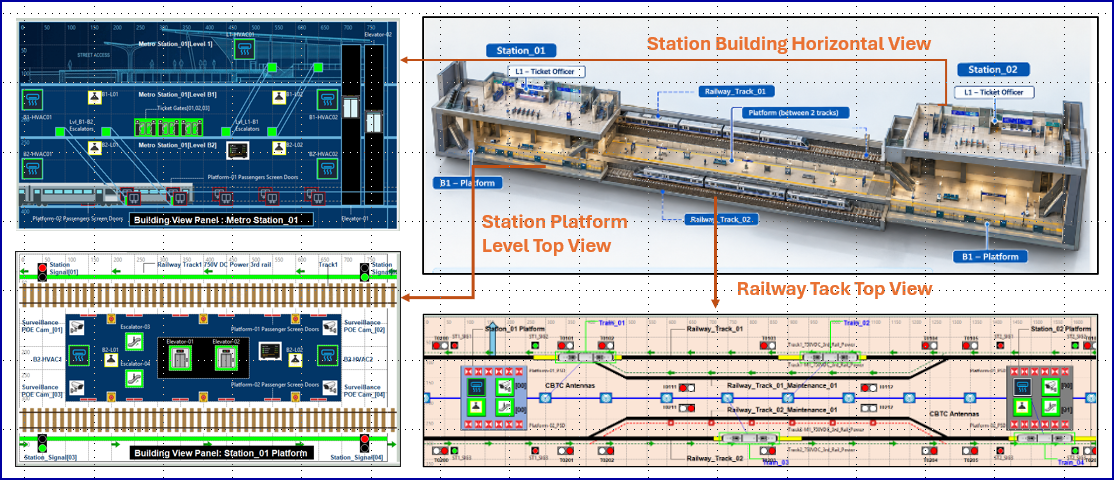
The cyber twin models four key subsystems relevant to metro OCC operations and station management: the Railway Station Building Management System, Railway Platform Management System, Railway Track and Signalling System, and Moving Block Train Control System. A simple mapping view between physical railway infrastructure and the corresponding cyber twin simulation components is shown below:
1.1 Cyber Twin System Overview
1.1.1 Four Main SCADA Subsystems
The Metro Railway Station Cyber Twin System comprises four major SCADA subsystems :
-
Station Building Management System : Simulates two underground metro stations with the both the common building automation equipment (such as lighting, HVAC, elevators...) and the railway-specific facilities (such as ticket gates, station ventilation systems, and various alarm systems).
-
Station Platform Management System : Models platform-level equipment and passenger management functions at both stations such as automatically controlled platform screen doors, train detection sensors, surveillance cameras, people-counting radar,broadcast systems and the tunnel ventilation system.
-
Railway Track and Signalling System : Simulates four railway tracks ( 2 direct connect with 2 maintenance) connecting the two stations, together with a 750 V DC third-rail traction power supply system, track-fork-switch control, railway signalling equipment, and trackside train detection sensors.
-
Communication-Based Train Control (CBTC) System : Simulates multiple trains operating between the two stations according to train schedule, track conditions and signalling information. For trains sharing the same track, a simplified simulated CBTC model supports automatic speed adjustment, trains movement coordination, and automatic train protection.
1.1.2 Cyber Twin Interface View
The system physical world simulation UI provides a visual representation of railway stations, tracks, trains, and associated infrastructure components as shown below:
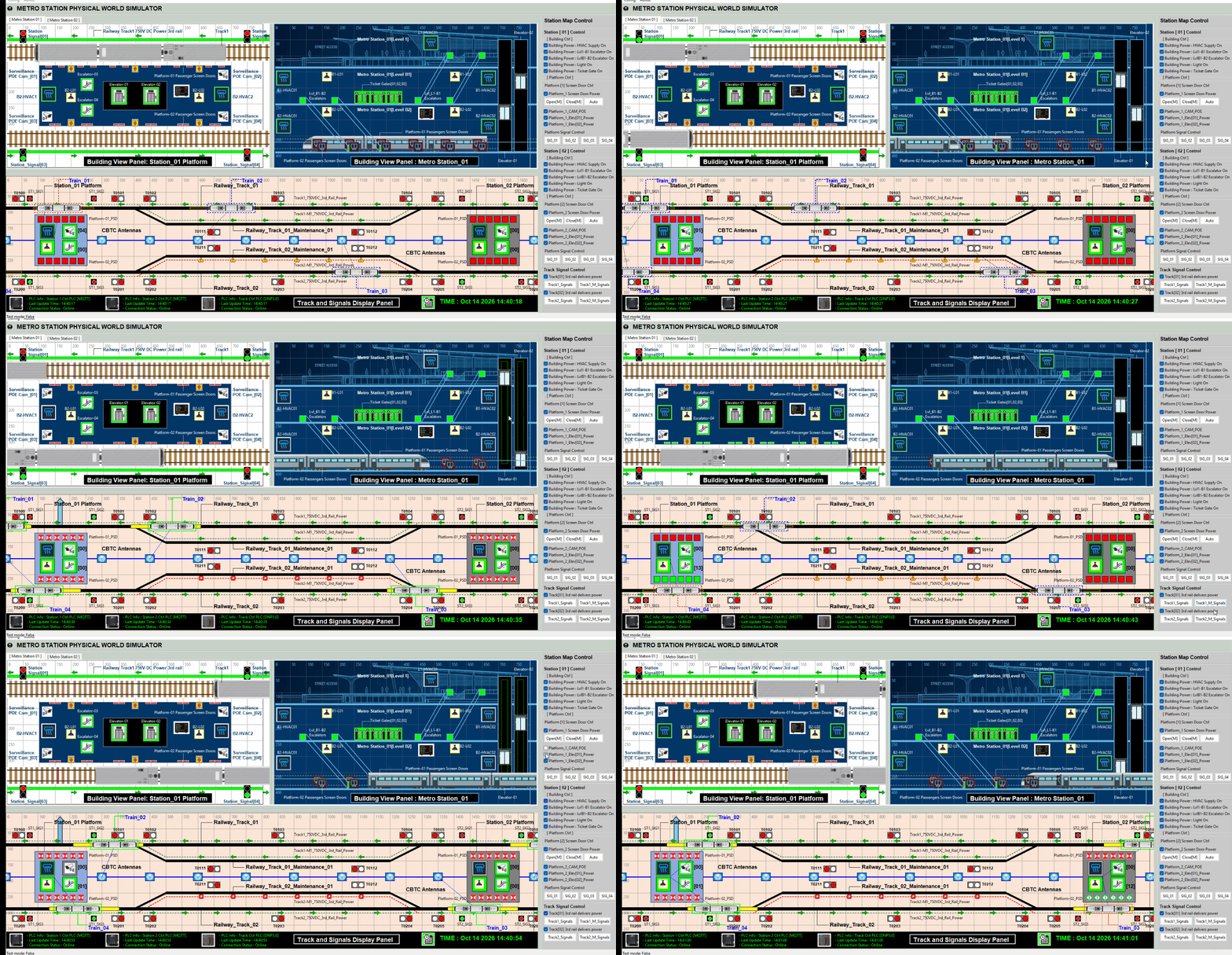
The interface enables users to observe simulated system states and understand the operational effects of changes to individual components and interconnected subsystems.
1.1.3 System OT Communication Protocols
To support realistic interactions between the simulated infrastructure components, the platform incorporates the PLC/RTU simulators I developed and four industrial OT communication protocols:
-
Modbus TCP (IEC 61158): Supports communication for power control and related OT components.
-
BACnet (ISO 16484-5): Supports building automation and the collection of building sensor data.
-
MQTT (ISO/IEC 20922): Supports the exchange of platform and railway track status information and control messages.
-
DNP3 (IEEE 1815-2021): Supports communication within the simulated auto train control and CBTC schedule system.
For the PLC and RTU simulator module, please refer to this project: https://github.com/LiuYuancheng/PLC_and_RTU_Simulator
1.2 Design Objectives and Intended Use Cases
The system adopts a layered OT architecture covering ISA-95 Levels 0 to 3, representing physical processes, basic control, supervisory control, and manufacturing or operational management functions, as applicable to the simulated railway environment. Its primary design objectives and use cases are as follows:
-
Demonstrate the operational impact of OT cyber threats: Provide a controlled environment to investigate how attacks against individual PLCs, RTUs, communication protocols, or SCADA subsystems could disrupt railway operations, compromise station services, or propagate across interconnected infrastructure systems.
-
Support cybersecurity exercises and professional training: Enable railway operators, cybersecurity practitioners, researchers, and students to practise threat analysis, attack detection, incident response, and recovery in a simulated metro railway environment.
-
Facilitate cross-domain OT security analysis: Demonstrate the dependencies among train control, railway signalling, station building automation, platform management, and supporting infrastructure, highlighting how incidents in one subsystem may affect other operational domains.
-
Provide a cost-effective and scalable simulation platform: Offer a software-based alternative to physical OT testbeds that can be deployed in laboratories, academic institutions, and cyber exercise environments without requiring a complete physical railway infrastructure.
-
Support OT security research and education: Provide a repeatable and configurable platform for investigating SCADA security, industrial protocol behaviour, attack scenarios, defensive mechanisms, and the operational consequences of cyber incidents.
2. Cyber Twin System Structure
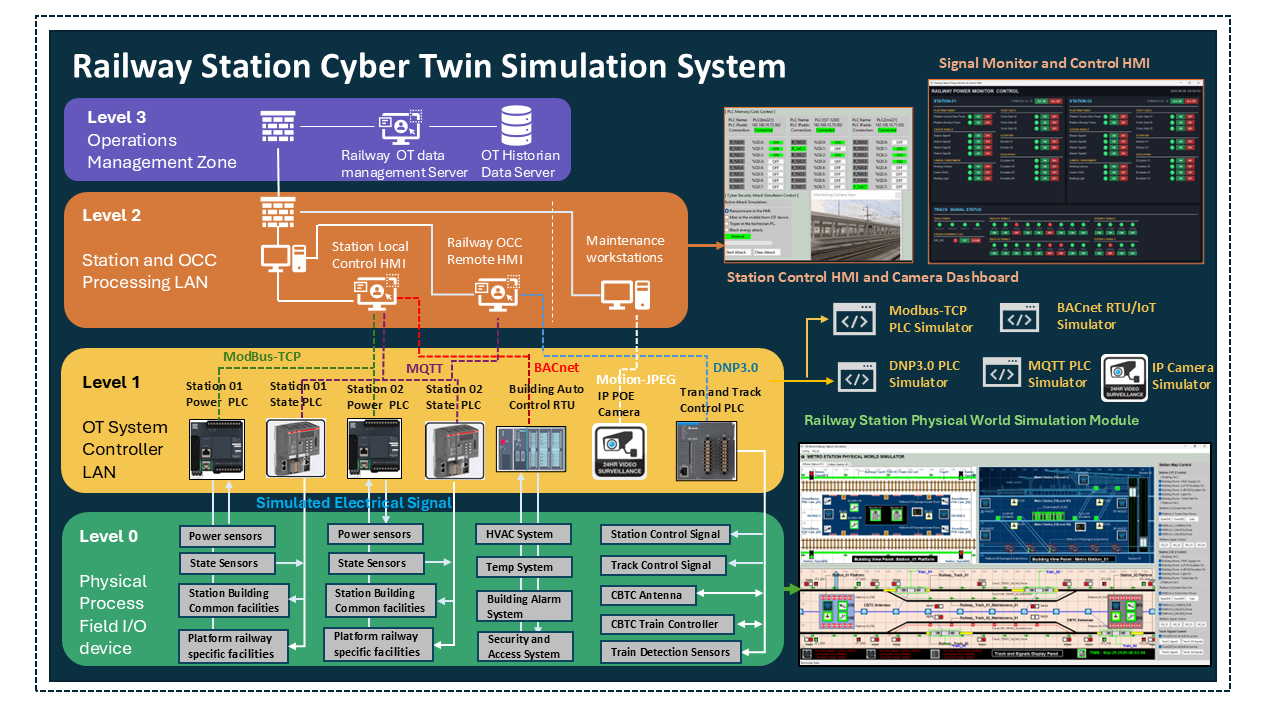
The Railway Station Cyber Twin Simulation System is structured across multiple (ISA-95) levels of the OT environment, spanning Level 0 (Physical Process and Field I/O Devices) to Level 3 (Operations Management Zone). As illustrated in Figure below, the architecture models the interactions among railway station buildings, passenger platforms, railway tracks, train control systems, and their associated SCADA infrastructure. It integrates a software-based physical-world simulation, industrial controller simulators, operator interfaces, and backend data management services into a unified environment.
2.1 OT Level 0: Physical Process and Field I/O Devices
In this level, the system simulates the physical world environment using a game-like environment that models the interactions between trains, tracks, sensor, power system and building facilities. It acts as the virtual field layer and includes:
-
Station building facilities simulation : Models common building services, including lighting, heating, ventilation and air conditioning (HVAC), elevators, escalators, building access-control doors, train information displays, public address speakers, and Power over Ethernet (PoE) surveillance cameras.
-
Station building power systems: Represents the normal 220 VAC power supply to all the simulated building facilities together with power sensors that monitor the electrical status.
-
Railway-specific station facilities: Models emergency and warning lights, emergency buttons, fire alarm systems, station signals, train-position sensors, platform screen doors, ticket gates, and other railway-specific equipment.
-
Railway-specific power systems: Represents dedicated power supplies and associated monitoring functions for railway equipment. The simulation includes a nominal 480 V DC supply where configured for the relevant facilities.
-
Track control and signalling: Simulates four railway tracks connecting the two stations, including the 750 V DC third-rail traction power system, train detection sensors, track signals, station signals and track-switch control mechanisms.
-
Train and CBTC simulation: Models multiple trains moving along the tracks, with simulated CBTC antennas, train controllers, and train detection sensors supporting train movement coordination, speed adjustment, and automatic train protection logic.
These components receive simulated electrical control signals from next Level 1 PLCs and return virtual feedback signals, such as the train position, light state, current CBTC train speed adjustment.
2.2 OT-Level 1: OT System Controller LAN
This level represents the industrial control layer, where simulated PLCs, RTUs, building automation interfaces, and camera components communicate with the Level 0 virtual field environment. The main components and their functions are as follows:
-
Station power control PLC: Simulated Modbus TCP PLCs manage and monitor the power status of station facilities. They exchange control commands and feedback measurements (voltage and current) with the corresponding virtual power systems.
-
Station equipment state control PLCs: Simulated MQTT-based control components manage equipment operating states, such as lighting and HVAC settings, and exchange state information with the physical-world simulation.
-
Building automation and sensor interfaces: Simulated BACnet RTU/IoT components collect and exchange building monitoring data such as temperature readings, occupancy information, and building access-control status.
-
Railway track and train control PLCs: Simulated DNP3.0-based PLC/RTU components interface with track-control and train-control functions, including signalling equipment, train detection, and CBTC-related simulation components.
-
Motion-JPEG IP camera simulation: Simulated Motion-JPEG IP camera components provide video streams for station monitoring and integration with the station control interface.
All devices communicate using simulated high-frequency UDP signals representing electrical states, then execute the automated control logic (such as the PLC ladder logic), the feed back the simulated control electrical to physical world, at the same time, these devices will provide different OT protocol interface for data exchange among them and the next level's OT HMI/Control-console.
2.3 OT Level 2: Station and OCC Processing LAN
This level represents the station and central operational supervision layer. It hosts the human-machine interfaces (HMIs) and maintenance workstations used by operators to monitor railway infrastructure, issue control commands, and investigate operational events :
-
Station Local Control HMI: Provides station personnel with an interface for monitoring and controlling building facilities, power-related states, and selected platform equipment. It also presents camera feeds and relevant equipment status information to support local operational supervision.
-
Railway OCC Remote HMI: Provides central operators with a consolidated view of train movements, CBTC-related states, track occupancy, railway signalling, and station platform conditions. Subject to the configured control permissions, operators can issue remote commands to selected station and track subsystems.
-
Maintenance Workstations: Support equipment diagnostics, system configuration, troubleshooting, and examination of SCADA events and operational status.
Level 2 forms the principal human interaction layer of the cyber twin cyber. This interaction enables exercise participants to investigate how compromised operator workstations, unauthorised remote access, manipulated HMI information, or malicious control actions could affect railway operations.
2.4 OT Level 3: Operations Management Zone
This level represents the operational management and data services layer above the station and OCC processing environment with backend services for collecting, managing, and retaining railway OT information
-
Railway OT Data Management Server: Provides centralised access to operational data collected from the simulated railway subsystems. It supports monitoring, data retrieval, and integration with higher-level operational management functions.
-
OT Historian Data Server: Stores historical operational information, such as equipment-state changes, process measurements, controller events, and other configured telemetry. These records support the reconstruction of simulated incidents and analysis of system behaviour over time..
This layer supports data-driven decision-making, incident analysis, and reporting as part of training or red-blue team simulation scenarios.
3. System Modules and Network Configuration
The current release (v0.0.4) of the Railway Station Cyber Twin Simulation System comprises three core software modules: the 2D Physical World Visualization Module, the PLC Controller Simulation Module, and the Subway SCADA-HMI System Module. As a fully software-based OT simulation platform, the system can be deployed across multiple virtual machines (VMs), allowing each module to operate independently while communicating through dedicated virtual networks.
For cyber exercise deployment, the system uses three separated subnets as shown below:
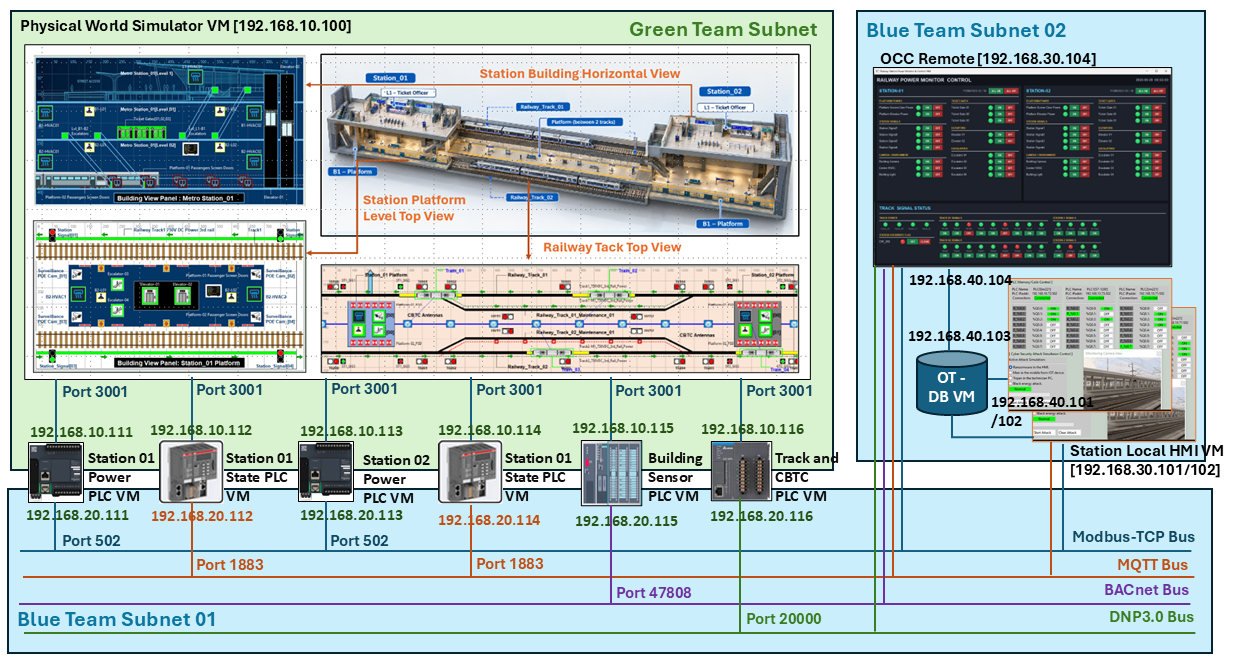
| ID | Network Name | Example subnet | Primary purpose | Access Team |
|---|---|---|---|---|
| GT | Green Team (GT) | 192.168.10.0/24 |
Simulated Physical-world electrical wires connection and internal PLC process-state exchange | GT, WT |
| BT01 | Blue Team OT (BT01) | 192.168.20.0/24 |
SCADA level 1 OT protocol services and HMI-to-controller communications | GT, BT |
| BT02 | Blue Team HMI/Data (BT02) | 192.168.30.0/24 |
SCADA level 2 HMI access and historian database communications | GT, BT |
3.1 System Modules Introduction
The three system module main function and the VM's NIC configuration is shown below:
3.1.1 2D Physical World Visualization Module
-
This module provides a top-down graphical representation of the two railway stations, connecting tracks, trains, and associated infrastructure. It simulates the operational behaviour of the virtual railway environment, including equipment states, train movement, track occupancy, signalling indications, and interactions between station facilities and railway operations.
-
The Physical world simulation module VM will be setup in the GT subnet with only one network interface.
3.1.2 PLC Controller Simulation Module
-
This module simulates key OT components such as PLCs and RTU units. It manages the virtual electrical signal exchange between the physical layer (Level 0) and the control systems (Level 1), enabling accurate simulation of signal systems, sensor detection, and automate control logics.
-
Every PLC simulator VM will have two network interfaces: one GT NIC to linked to the physical world simulator to exchange simulated field-state and control information, one BT01 NIC to linked to different OT buses.
3.1.3 Subway SCADA-HMI System Module :
-
The Subway SCADA-HMI System Module provides the supervisory monitoring and control interfaces for local station operators and remote OCC personnel. It comprises station-local HMIs, an OCC remote HMI, and the associated OT data services. The HMI will start different OT clients to linked to the OT buses to exchange data with the related PLC(s).
-
Every HMI will have two network interface : one linked BT1 subnet communicates with PLC simulator services using the configured industrial protocols, one BT02 interface supports HMI-side data exchange and access to the historian database service.
3.2 Network Configuration Example
Below is a simple network configuration example when setup in a cyber exercise cluster with 11 VMs:
| VM ID | Module Name | GT IP | BT01 IP | BT02 IP |
|---|---|---|---|---|
| RSCT_PW | Physical World Simulator | 192.168.10.100:3001 | N.A | N.A |
| RSCT_PLC01 | Station 01 Power PLC | 192.168.10.111 | 192.168.20.111:502 | N.A |
| RSCT_PLC02 | Station 01 State PLC | 192.168.10.112 | 192.168.20.112:1883 | N.A |
| RSCT_PLC03 | Station 02 Power PLC | 192.168.10.113 | 192.168.20.113:502 | N.A |
| RSCT_PLC04 | Station 02 State PLC | 192.168.10.114 | 192.168.20.114:1884 | N.A |
| RSCT_PLC05 | Building Sensor PLC | 192.168.10.115 | 192.168.20.115:47808 | N.A |
| RSCT_PLC06 | Track and CBTC PLC | 192.168.10.116 | 192.168.20.116:20000 | N.A |
| RSCT_ST_HMI01 | Station1 local HMI | N.A | 192.168.20.117 | 192.168.30.101 |
| RSCT_ST_HMI02 | Station2 local HMI | N.A | 192.168.20.118 | 192.168.30.102 |
| RSCT_OCC_HMI | OCC Remote HMI | N.A | 192.168.20.119 | 192.168.30.104 |
| RSCT_OT_DB | OT Historian Database | N.A | N.A | 192.168.30.103 |
4. Design of the 2D Physical World Visualization
The 2D Physical World Visualization Module provides an interactive graphical representation of the two metro railway stations, their underground facilities, passenger platforms, connecting railway tracks, CBTC signalling system and train movements. The interface also includes a dedicated Item Override Control Panel for the Green Team (or authorised users such as simulated maintenance engineers) to manually override selected equipment states or power supply conditions to represent physical interventions, including manually flipping a circuit breaker. The UI view of the physical world simulate is shown below:
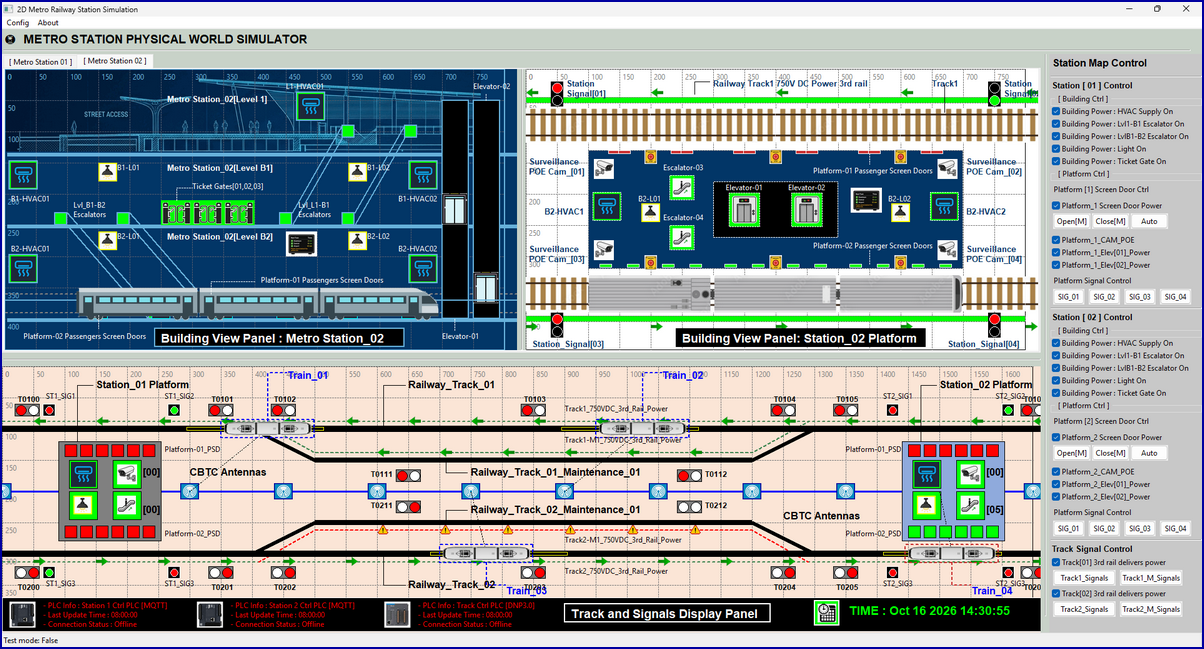
The main interface consists of six panels arranged into four functional groups:
-
Two Station Building Blueprint Horizontal View Panels, one for each station.
-
Two Platform Top-Down View Panels, one for each station.
-
One Railway Track Top-Down View Panel covering the interconnected track environment.
-
One Item Override Control Panel for equipment-state intervention and system monitoring.
4.1 Station Building Blueprint Horizontal View Panel
The Station Building Blueprint Horizontal View Panel presents a horizontal cross-sectional view of a three-level (L1-B2) underground metro station, covering the street-level entrance (L1), ticket lobby (B1), and passenger platform (B2). The panel provides an intuitive view of the relationship between station facilities and their physical locations as shown below:
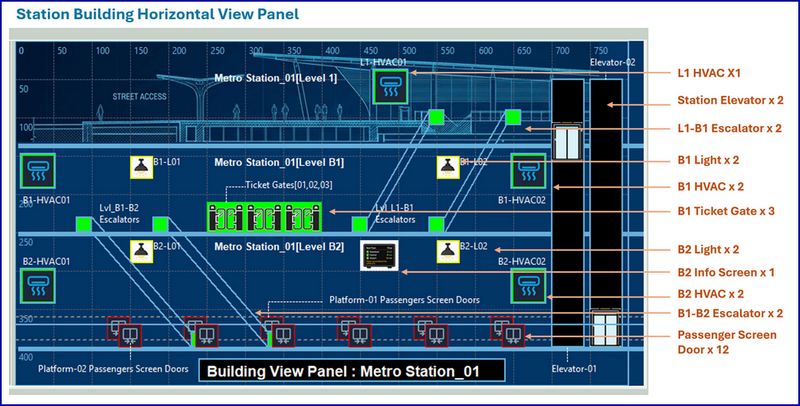
For each level the components includes:
-
L1 – Street Access : HVAC unit x 1, lighting system x 1, emergency light x 1, access-control door x2, elevators x 2.
-
B1 – Ticket Lobby : HVAC units x 2, lighting systems x 2, emergency lights x 2, ticket gates x 3 (entry, exit, and backup), and L1–B1 escalators x 2
-
B2 – Passenger Platform : HVAC units x 2, lighting systems x 2, emergency lights x 2, B1–B2 escalators x 2, passenger information display x 1, platform screen doors x 12 (6 on each side), and railway tracks x 2
Equipment indicators are updated according to the corresponding simulated process states, enabling users to observe normal operation, equipment faults, and power-related disruptions.
For example, when the power supply to the normal lighting system is interrupted, the corresponding lighting indicators change state and the station interior becomes dark in the simulation. Emergency lighting can be activated according to the configured control logic, while a flashing alarm indicator alerts users to the lighting power failure.
4.2 Platform Top-Down View Panel
The Platform Top-Down View Panel presents a vertical, top-down view of the passenger platform and its surrounding railway infrastructure as shown below:
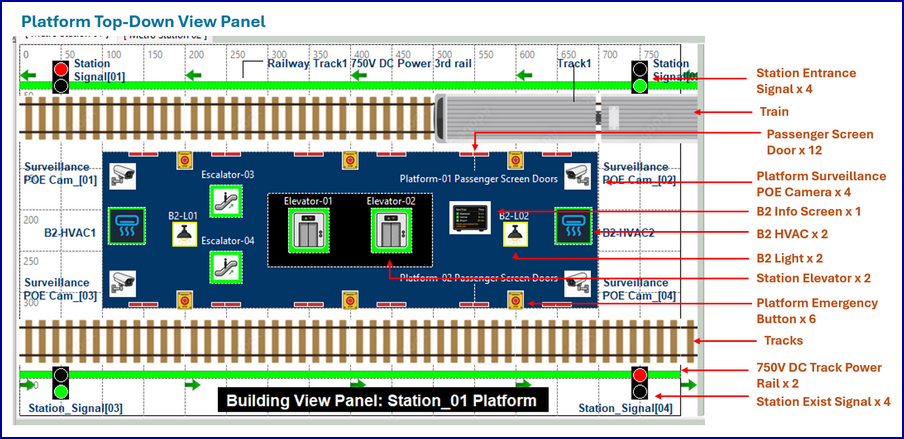
The panel includes the following simulated components:
-
Track and signalling : railway tracks x 2, station entrance signals x 4, station exit signals x 4, 750 V DC traction power rails x 2, train-position detection sensors x 4, and train-station lock link x 4.
-
Platform specific facilities : platform screen doors x 12, emergency buttons x 6, station ventilation fans x 2, tunnel ventilation fans x 4, passenger information display x 1, public address speakers x 2, and people-counting radar x 1.
-
Building normal facilities : B1–B2 escalators x 2, station elevators x 2, B2 lighting systems x 2, B2 HVAC units x 2, and PoE surveillance cameras x 4.
The visual indicators also support the investigation of abnormal conditions, such as a platform screen door failing to close, a signal changing to an unexpected state, or a ventilation system becoming unavailable.
4.3 Railway Track Top-Down View Panel
The Railway Track Top-Down View Panel provides an overview of the railway track layout, trackside signalling equipment, train detection devices, and CBTC-related train-control information. It represents the two operational tracks and two maintenance tracks connecting the stations, together with the associated signalling and switching infrastructure as shown below:
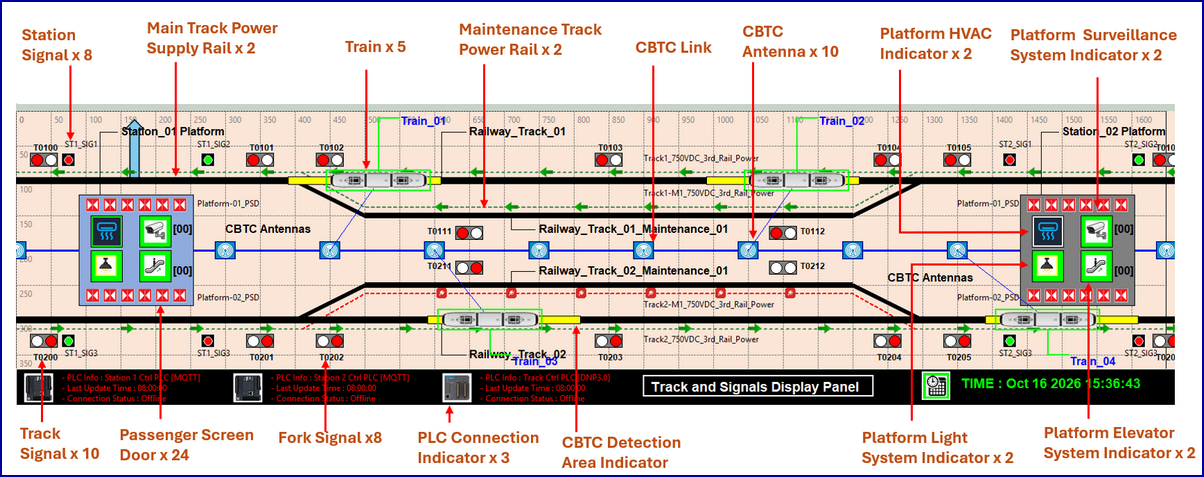
The panel contains three principal groups of components :
-
Railway tracks and signalling : operational track x 2, maintenance track x 2, track signals x 10, track fork switches x 4, switch-related signal x 8, operational-track power rail x 2, and maintenance-track power rail x 2.
-
Station facilities and indicators : Station platform x 2, platform screen door x 24, HVAC system indicators x 2, surveillance system indicator x 2, lighting system indicator x 2, elevator system indicator x 2, station signals x 8, and train-position sensors x 8.
-
CBTC and train simulation : train objects x 5, CBTC communication link x 1, CBTC antennas x 10, train speed and position senor x 24.
The train position information is synchronised across the building, platform, and railway track views
4.4 Item Override Control Panel
The Item Override Control Panel provides the Green Team with a dedicated interface for manually intervening in selected simulated physical processes. It is designed to represent actions that could be performed by maintenance personnel or other authorised staff in the physical environment, independently of normal SCADA control commands.
The panel provides two main functions:
-
PLC connectivity and system status monitoring: Displays the connection status of the simulated PLCs and relevant system information, including the simulation time.
-
Manual equipment and power overrides: Provides checkboxes and control buttons for selecting equipment groups and manually changing supported states. For example, a user can simulate switching off the power supply to a selected group of facilities or changing the state of a specific component to represent a maintenance intervention.
5. Design of Simulated PLC Controller Modules
The Railway Station Cyber Twin Simulation System provides four types of simulated PLC controller modules to implement the monitoring, communication, and control behaviours of industrial automation functions used in railway station and track infrastructure. The implementation is based on the Python-based PLC_and_RTU_Simulator framework liborary I developed specifically to simulate industrial controllers and their communication interfaces.
Each PLC simulation framework connects the virtual physical environment at Level 0 with the OT controller network at Level 1 and the SCADA-HMI interfaces at Level 2 with 2 kinds of communication module:
-
Physical Word Connecter : to simulate the electrical signals directly from physical sensors, each simulated PLC periodically retrieves the corresponding component states and sensor values from the Physical World Visualization Module.
-
OT SCADA Comm Service: expose process values through the related configured OT industrial communication buses, allowing authorised HMI clients to monitor system conditions control requests.
After receiving the simulated field data, the controller executes its configured control logic, implemented using supported Ladder Diagram (LD) or Structured Text (ST) logic where applicable. The four controller types provide complementary monitoring and control functions within the Railway Station Cyber Twin Simulation System.
| Controller type | Instances | Primary function | Main data model |
|---|---|---|---|
| Modbus TCP PLC | 2 | Station and platform power control | 31 holding registers and 32 coils per station |
| MQTT PLC | 2 | Equipment state and operating-parameter control | 40 state-value topics and 40 control-command topics per station |
| BACnet controller | 1 | Building and tunnel sensor monitoring | 42 configured sensor parameters |
| DNP3 PLC | 1 | Track signalling and selected train-control functions | 54 binary inputs, 28 analog inputs, and 72 binary outputs |
5.1 Modbus TCP PLC for Power Control
The Modbus TCP PLC module manages the power supply to station building facilities and railway platform equipment. The control behaviour follows the motorised circuit-breaker control approach described in the article Use PLC to Remote Control Circuit Breaker in Power System. The main simulated configuration diagram is shown below:
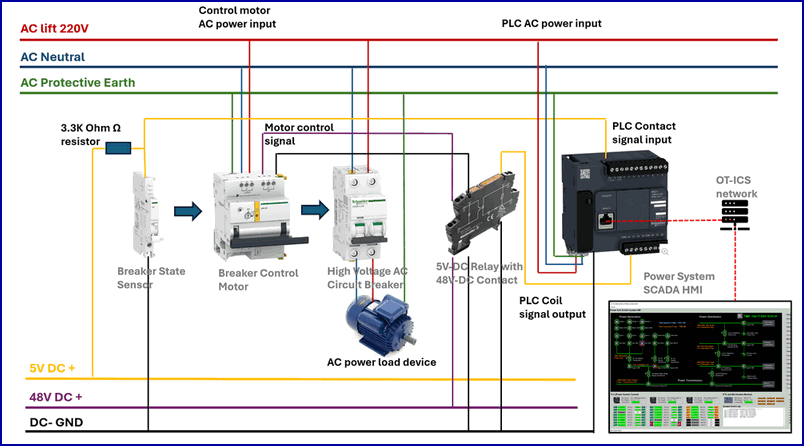
5.1.1 Controller configuration
| Parameter | Configuration |
|---|---|
| Number of PLC instances | 2 |
| Protocol | Modbus TCP |
| Main function | Monitor and control the power supply to station building and platform facilities |
| Control scope | One station per PLC |
| Holding registers | 31 per station |
| Coils | 32 per station (include one remote overwrite flag) |
Each station power-control PLC maintains 31 holding registers for the power-related state and measurement values of its assigned components. The PLC also maintains 32 coils for controlling the corresponding motorised circuit-breaker states.
5.2 MQTT PLC for Equipment State Control
The MQTT PLC module controls and monitors the operating states of station building and platform equipment. It is designed for components whose behaviour involves multiple operating states or adjustable parameters rather than a simple power-on or power-off condition (such as escalator direction/speed, station ventilation fan speed, and other configurable equipment states.)The MQTT PLC workflow will follow below diagram:
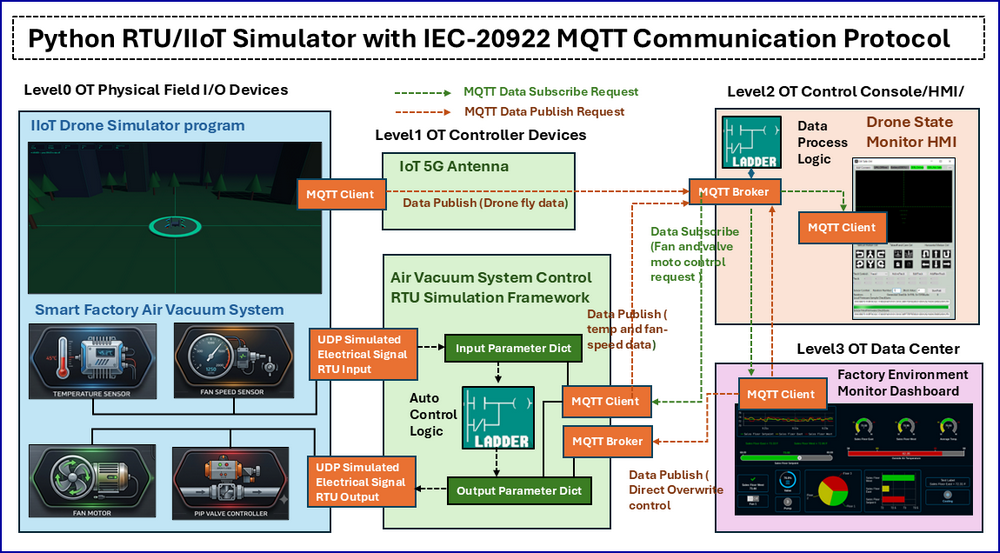
For the detailed MQTT PLC implementation, please refer to this article: https://www.linkedin.com/pulse/python-virtual-rtuiiot-simulator-iec-20922-mqtt-protocol-liu-gbqnc
5.2.1 Controller configuration
| Parameter | Configuration |
|---|---|
| Number of PLC instances | 2 |
| Protocol | MQTT |
| Main function | Monitor and control station building and platform equipment states |
| Control scope | One station per PLC |
| State-value topics | 40 per station |
| Control-command topics | 40 per station |
Each station MQTT PLC uses 40 topics to represent equipment state values and another 40 topics to support state modification requests.
MQTT-Broker parameter topic to store state-value :
parameters/value/RG_<BorkerAddress>$<parameterValue>`MQTT-Broker Parameter topic to modify control-command :
parameters/value/CL_<BorkerAddress>$<parameterValue>Each station MQTT PLC uses 40 topics to represent equipment state values and another 40 topics to support state modification requests. The topic structure follows the simulator's parameter-addressing convention.
5.3 BACnet Controller for Building Sensor Monitoring
The BACnet controller provides building environmental monitoring capabilities for the railway station and underground tunnel environment. It interfaces with simulated sensors that generate values representing environmental and occupancy conditions, including temperature, carbon dioxide (CO₂) concentration, and people-counting radar readings. These simulated sensor values are made available through a BACnet-based interface, enabling SCADA-HMI clients and configured automation components to retrieve the current readings. The BACnet PLC workflow will follow below diagram:
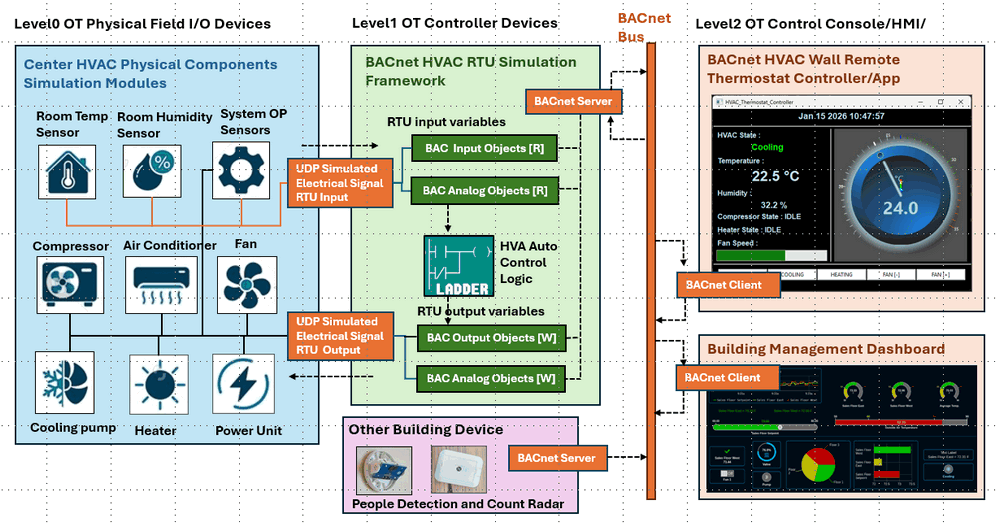
For the detailed BACnet PLC implementation, please refer to this article: https://www.linkedin.com/pulse/python-visual-building-controller-rtu-iso-16484-5-bacnet-liu-cfjgc
5.3.1 Controller configuration
| Parameter | Configuration |
|---|---|
| Number of PLC instances | 1 |
| Protocol | BACnet |
| Main function | Monitor station building and tunnel environmental sensors |
| Configured sensor parameters | 42 |
The controller exposes 42 sensor-related parameters through BACnet objects. Each parameter is assigned an object name, object identifier, current value, description, and engineering unit, as shown below.
{
    "objectName": "PF_CO2_Density",
    "objectIdentifier": ("analogValue", PARM_ID22),
    "presentValue": 0.043,
    "description": "Platform Air CO2 Density (percentage) ",
    "units": "percent"
}
The BACnet controller can also provide sensor information to other simulated controllers for automatic control. For example, when the measured CO₂ concentration exceeds a configured threshold, the building automation logic can generate an alert or make the sensor value available to the MQTT-based state controller. The state controller can then increase the station ventilation fan speed according to the configured control rules.
5.4 DNP3 PLC for Track Signalling and CBTC Functions
The DNP3 PLC module provides monitoring and control functions for the railway track, signalling infrastructure, and selected train-control functions in the cyber twin. It receives simulated train-position and speed measurements, monitors track occupancy and signal states, and provides an interface for exchanging configured control and status data with supervisory clients and other components.
The PLC will get the train detection sensor (pos/speed) and auto control the signal state such as guide the train dock and depart from the station or change the fork state to guide train enter the maintenance track. For each Train, then will report their current state to the CBTC antenna then send to PLC and process, after that the data will be broadcast to all the other trains along the track near the train so the train and other train near it can also adjust the speed to optimized the schedule. The signal PLC will also fetch the passengers data (such as the platform people counting radar state to dynamicaly adjust the schedule).
The DNP3.0 PLC workflow will follow below diagram:
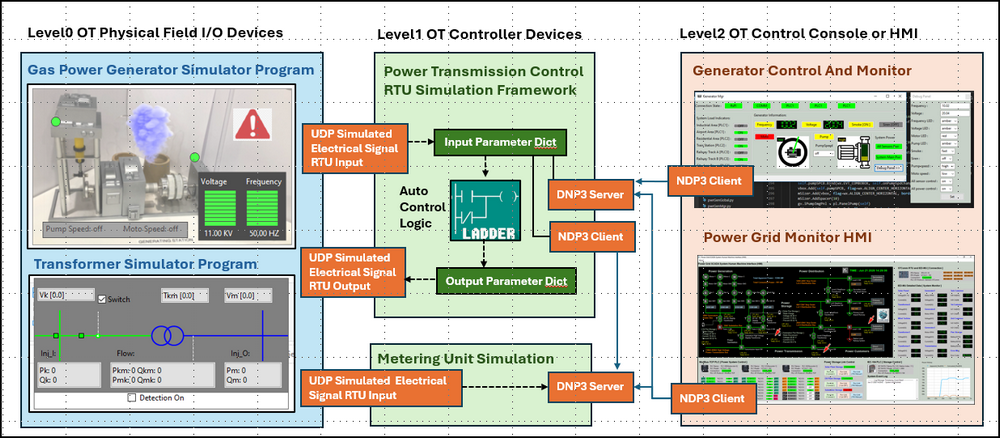
For the detailed DNP3.0 PLC implementation, please refer to this article https://www.linkedin.com/pulse/python-virtual-rtu-simulator-ieee-1815-2021-dnp30-protocol-liu-jtsec
5.4.1 Controller configuration
| Parameter | Configuration |
|---|---|
| Number of PLC instances | 1 |
| Protocol | DNP3 |
| Main function | Monitor and control track sensors, signalling equipment, and selected train-control functions |
| Binary inputs | 54 |
| Analog inputs | 28 |
| Binary outputs | 72 |
The 54 binary inputs represent discrete sensor and status values, such as train detection, track occupancy, and equipment states. The 28 analog inputs represent continuously varying or numerical measurements, including simulated train speed and train-position offsets. The 72 binary outputs represent discrete control points used to operate signalling states, track-switch states, and configured track power-control functions.
5.4.2 Simulated train communication and coordination
Each simulated train reports its current operating information, including position and speed, through the configured CBTC simulation interfaces. The corresponding data is collected and processed by the simulated train-control subsystem. Relevant information can then be distributed to other trains or control components to support train movement coordination and speed adjustment.
The control logic uses available train detection, track occupancy, and signalling information to determine appropriate actions within the simulated environment. Passenger-counting radar data can also be incorporated into selected operational scenarios, allowing exercise designers to explore how passenger demand may influence train scheduling or service management.
5.4.3 Output control and override protection
For each signal-related control parameter, the simulator includes a corresponding override flag. A remote control request can modify the associated signal state only when the configured override condition permits the operation. This mechanism provides a configurable control gate for remote commands and allows exercise scenarios to demonstrate how control permissions and interlocks affect signalling operations.
6 OCC HMI and CBTC Train Control
This section describes the design of the supervisory Human-Machine Interface (HMI) and the simulated Moving Block Communications-Based Train Control (CBTC) subsystem in the Railway Station Cyber Twin Simulation System.
6.1 Station and OCC HMI Design
The station and Operations Control Centre (OCC) HMIs provide the supervisory monitoring and control interfaces for the railway cyber twin. The HMI applications communicate with the simulated PLC controllers through four industrial protocol interfaces: Modbus TCP, MQTT, BACnet, and DNP3.
The OCC signal HMI UI is shown below:
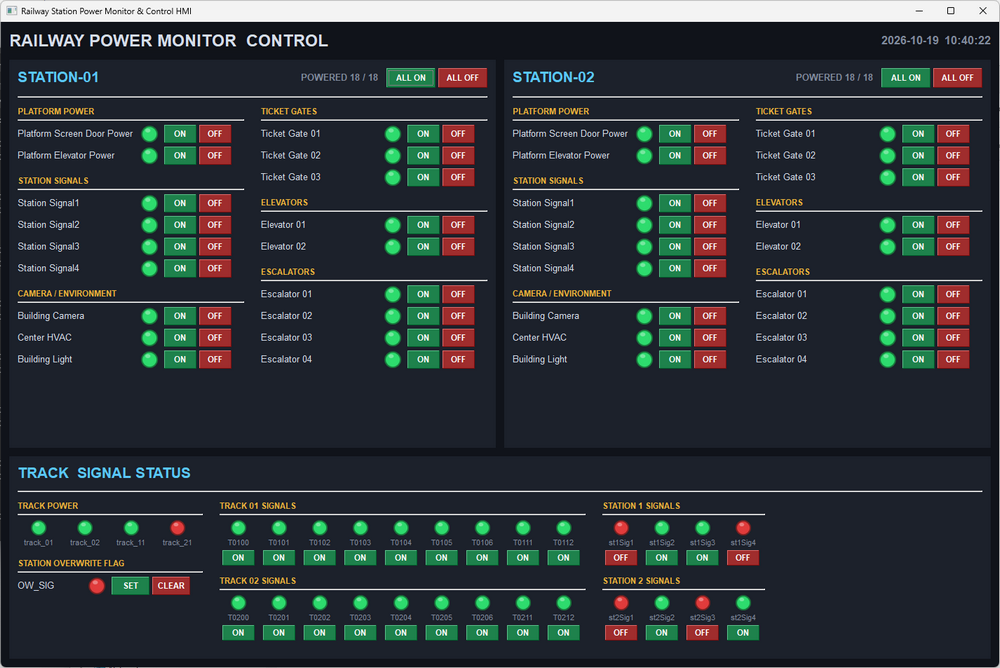
6.1.1 Power Monitoring and Control Interface
The power monitoring and control interface provides a consolidated view of the power-related states of Station 01 and Station 02. Each equipment entry includes a status indicator and ON/OFF controls.
The lower section of the HMI presents the track power and signalling status. It includes track power indicators, track signal states, station signal states, and a station signal override flag.
6.1.2 Multi-Protocol Data Acquisition and Control
The OCC HMI will start 4 different OT client to linked to the related OT bus to fetch the data from the PLC and sent the control command to the related PLC when the operator press the control buttons.
| Protocol | Main HMI interaction | Typical data |
|---|---|---|
| Modbus TCP | Read power-related registers and issue supported breaker-control requests | Power measurements, breaker states |
| MQTT | Retrieve equipment parameters and publish supported state-change requests | HVAC settings, escalator states, equipment operating modes |
| BACnet | Retrieve building and tunnel sensor values | Temperature, CO₂ concentration, occupancy-related measurements |
| DNP3 | Retrieve track and signalling data and issue supported control requests | Train detection, track signals, train speed and position values |
6.1.3 HMI Data Logging and Historian Integration
Each HMI module converts the current monitoring data into a structured JSON representation and archives the data in a local SQLite3 historian database. The historian supports several exercise and analysis activities:
-
Reviewing recorded equipment states and monitoring values.
-
Comparing station and track conditions before and after a simulated incident.
-
Examining changes in power, signalling, and equipment operating states.
-
Supporting post-exercise investigation and reporting.
6.2 CBTC Moving-Block Train Control
The Railway Station Cyber Twin Simulation System implements a simplified moving-block train-control model to simulate automatic train movement coordination and selected automatic train protection functions. The model represents key relationships between train position, train speed, track occupancy, signalling, and the communication of train-state information.
The Moving block signalling system components mapping diagram is shown below:
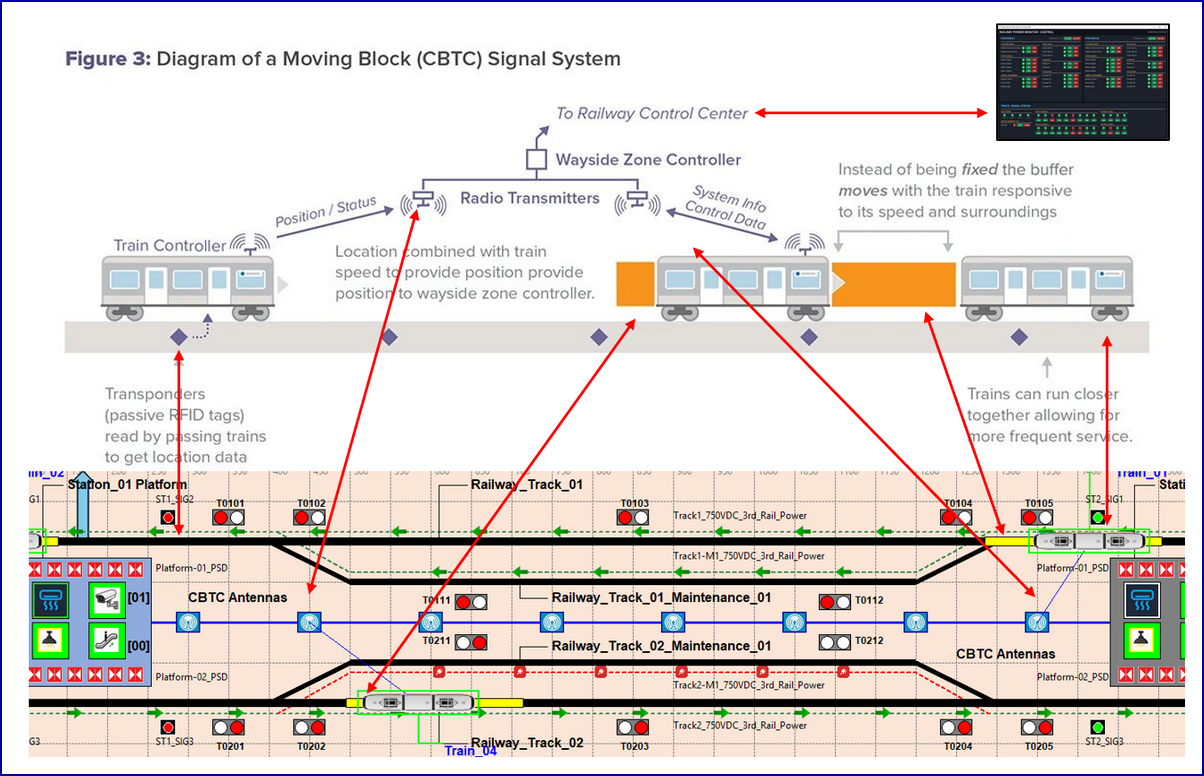
6.2.1 Mapping of Railway Components to CBTC Functions
Unlike a fixed-block model, in which track sections have predefined boundaries, a moving-block approach calculates or updates the permitted separation between trains according to their positions and movement conditions. In this cyber twin, the simulated safety blocks in front of and behind a train are adjusted dynamically according to the configured train-control logic. The principal components and their roles are described below.
-
Track transponders and train-position detection : Virtual track transponders are represented along the railway tracks by the green dashed-line elements in the mapping diagram. As a simulated train passes a transponder, the system uses the corresponding location reference to update or validate the train's position.
-
Train controller and state reporting : Each simulated train maintains its own operating state, including speed, traction, braking, and operational status. The train controller reports relevant position and status information through the configured CBTC communication model.
-
CBTC antennas and communication links : CBTC antennas are positioned along the simulated railway infrastructure to represent the communication points used for train-to-ground information exchange. In the cyber twin, the antenna objects and associated communication logic provide the link between the train objects and the simulated track-control subsystem.
-
Track-control PLC and signalling : The DNP3-based track-control PLC processes the configured train detection, track occupancy, and signalling information. It manages the supported track signals and switches and exchanges relevant process data with the supervisory HMI.
-
Dynamic safety-block management : The moving-block logic updates the simulated safe separation around each train according to its position, speed, and configured movement constraints. The region ahead of a train represents the space that must remain available for safe movement and stopping, while the region behind it represents the changing spatial relationship with following trains.
6.2.2 Train Operating States
Each simulated train is assigned one of four operating states. These states define the train's basic traction, speed, braking, and operational conditions and provide inputs to the train-control logic.
The current state definitions are shown below.
| State constant | Value | Simulated behaviour |
|---|---|---|
TRAIN_ST_STOP |
0 | Train power supply is on, speed is zero, throttle is zero, and the brake is applied. Operational status: stopped. |
TRAIN_ST_MOVING |
1 | Train power supply is on, speed is within the configured 10–70 km/h range, throttle is active, and the brake is released. Operational status: moving. |
TRAIN_ST_WAIT |
2 | Train power supply is on, speed is within the configured 0–2 km/h range, throttle is zero, and the brake is applied. Operational status: waiting. |
TRAIN_ST_EMERGENCY |
3 | Train power supply is off, speed is zero, throttle is disabled, and the brake is applied. Operational status: emergency stop. |
6.2.3 Dynamic Train Separation and Automatic Protection
The moving-block model continuously updates the separation requirements between trains based on their current operating conditions. When a train is moving, the model considers its reported position and speed together with the configured stopping and separation constraints. As the train approaches a restricted area or another train, the movement-control logic can reduce its permitted speed, command it to wait, or initiate an emergency stop according to the simulated protection rules.
The principal control sequence is as follows:
Acquire train and track data
-
Acquire train and track data: Collect train positions, speeds, track detection states, and relevant signal information.
-
Evaluate movement conditions: Determine the train's location relative to the track layout, nearby trains, and configured movement restrictions.
-
Update separation requirements: Recalculate the permitted movement region and safety separation according to the configured moving-block model.
-
Apply train-control actions: Allow movement, adjust the simulated speed, maintain a waiting state, or trigger the emergency-stop state when the relevant conditions are met.
-
Update the visualisation and HMI: Reflect the resulting train positions, operating states, and signalling conditions in the physical-world display and supervisory interface.
Thanks for spending time to check the article detail, if you have any question and suggestion or find any program bug, please feel free to message me. Many thanks if you can give some comments and share any of the improvement advice so we can make our work better ~
last edit by LiuYuancheng ([email protected]) by 16/10/2026 if you have any problem, please send me a message.
