
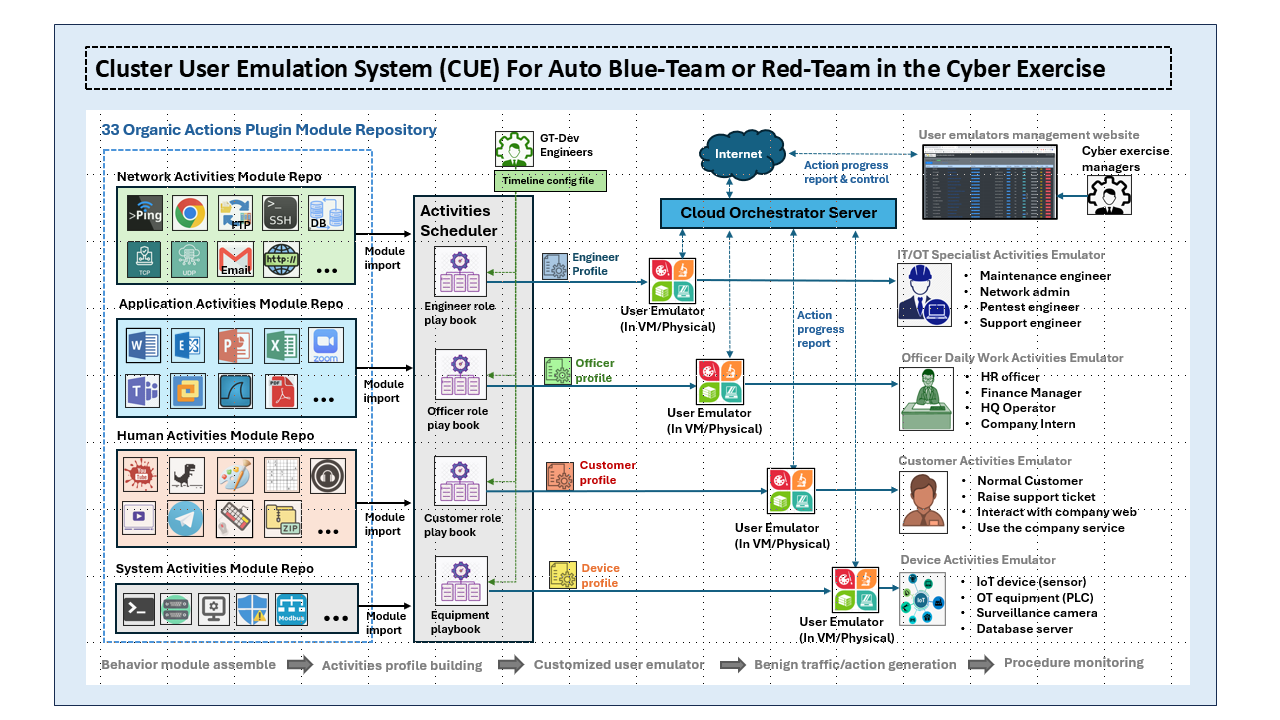
Project Design Purpose : The Cluster User Activities Emulation (CUE) System is a distributed, automated, and reusable toolkit designed to generate both benign and malicious user activities across a simulated network environment (such as a cyber exercise cluster). The primary objective of the project is to emulate realistic cyber environments by creating human-like user behavior, network traffic, system events, and attack activities that can be customized for a wide range of cybersecurity research, education, testing, and operational scenarios.

Unlike traditional traffic generators that only produce network packets, CUE focuses on behavior-driven activity emulation, enabling the simulation of complete user workflows, attacker operations, and defender responses across multiple hosts. This approach creates realistic datasets and system interactions that are valuable for Digital Forensics and Incident Response (DFIR), cyber range exercises, security validation, and malware research. This toolkit is designed to fulfill the following requirements:
-
Simulation of a mid size of cluster/network with active users (generate human activities) for DFIR data collection.
-
Simulation of red team attacks or recurrent attack scenarios in cyber exercise/events.
-
Simulation of blue team defense activities or the creation of live honeypots.
-
Provide real time monitoring and management interface of cyber exercise management team.
-
Automated to do regular penetration test or stress test for a system or service.
-
Assistance in cyber-security education and professional training.
-
Building the customizable malware for researching purposes.
By meeting these objectives, our toolkit aims to enhance cybersecurity preparedness, training, and research efforts by providing comprehensive and adaptable functionalities.
# Author:      Yuancheng Liu
# Created:     2024/01/20
# Version:     v_0.2.3
# Copyright:   Copyright (c) 2026 LiuYuancheng
# License:     GNU Lesser General Public License v3.0
1. Project Introduction
The Cluster User Emulation (CUE) System is a distributed user behavior and activity emulation platform designed to simulate realistic user, device, and attacker behaviors across multiple hosts within a network or compute cluster. Unlike conventional traffic generators that only produce network packets, CUE emulates complete user workflows by combining operating system interactions, application usage, network communications, and automated attack or defense activities.
The platform enables researchers, instructors, security engineers, and penetration testers to construct repeatable and configurable cyber environments that closely resemble real enterprise networks. By orchestrating multiple emulation agents simultaneously, CUE can generate realistic background activities, execute complex attack scenarios, and produce comprehensive datasets for Digital Forensics and Incident Response (DFIR), AI/ML model validation, cybersecurity training, and cyber range exercises.
1.1 System Main Features
The CUE System provides the following core capabilities:
-
Extensible Activity Repository – A reusable library of both benign and malicious activity plugins that allows users to build customized Human, Device, Insider, or Hacker behavior models.
-
Automated User Action Emulation – Supports robotic process automation (RPA)-style execution, scheduled tasks, randomized user activities, and repeatable Red Team attack paths or Blue Team defense procedures.
-
Network Traffic Generation – Produces realistic network traffic using multiple communication protocols for penetration testing, service stress testing, protocol validation, and network security research.
-
Centralized Monitoring and Management – Provides a web-based management platform for monitoring emulator status, task execution progress, node health, generated traffic, and group-user interactions across the cluster.
-
Repeatable AI/ML Test Environment – Generates reproducible datasets containing user activities, operating system events, application logs, and network traffic for developing, training, and validating cybersecurity AI/ML models.
1.1.1 System Feature Demo Video
With the above versatile capabilities, the Cluster User Emulation system proves invaluable for cybersecurity exercises, research projects, AI/ML testing, and process automation.
User Action Emulator Demo Videos
1.2 System Structure and Overview
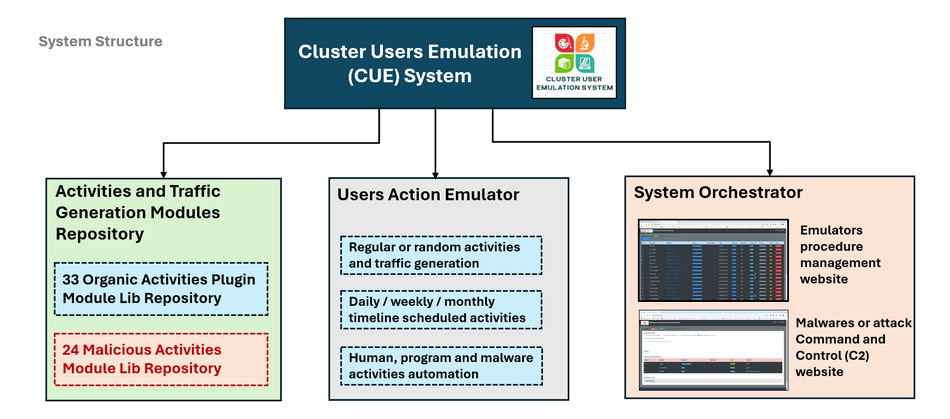
The Custer User Emulator System contents three main parts, the Activities Generation Modules Repository, the Users Action Emulator and the System Status Orchestrator as shown blow :
1.2.1 Activities and Traffic Generation Modules Repository
The Activities Generation Modules Repository is a collection of library modules for generating both benign and malicious activities and traffic:
-
Organic Activities Repository – Currently contains 33 plugin modules that emulate legitimate user (blue team) operations, application usage, file access, web browsing, email communication, network services, and other daily activities.
-
Malicious Activities Repository – Currently contains 24 plugin modules that simulate attacker (read team) behaviors, malware execution, command-and-control (C2) communication, privilege escalation, persistence techniques, lateral movement, and other offensive security activities.
1.2.2 User Action Emulator Module
The User Action Emulator is the execution engine responsible for running activity plugins on target machines. It assembles selected modules from the repository into configurable workflows and executes them according to user-defined schedules or randomized timelines, the main function includes:
-
Continuous or randomized background activity generation
-
Daily, weekly, or monthly scheduled tasks
-
Automated human, software, and malware behavior simulation
-
Repeatable attack replay for Red Team exercises
-
Automated defensive actions for Blue Team training
1.2.3 System Centralized Orchestrator
The System Orchestrator is the centralized management server responsible for coordinating all distributed User Action Emulators within the cluster. It continuously collects execution status, activity logs, resource utilization, and communication statistics from each emulator, providing operators with a unified web-based management interface for monitoring and controlling the entire environment. The main function includes:
-
Centralized task scheduling and deployment
-
Activity execution monitoring
-
Cluster node status management
-
Emulator configuration management
-
Malware and Command-and-Control (C2) management interface
-
Real-time visualization of emulator activities and execution progress
2. System Design and Workflow
The CUE System follows a modular design philosophy, allowing activity modules, user roles, execution playbooks, and emulation nodes to be independently developed, reused, and combined to create realistic cyber environments.
2.1 System Workflow
The overall workflow of the CUE System consists of five sequential stages, as illustrated below.

2.1.1 Step 1 – Behavior Module Assembly
-
The workflow begins by user selecting needed plugin modules from the Activities Generation Modules Repository.
-
Then the users choose the API with the related activity modules, communication protocols, application behaviors, operating system actions, and attack modules to build a desired user profile.
2.1.2 Step 2 – Activity Profile Construction
-
After the required modules have been selected, they are assembled together with one or more playbooks to form a complete activity profile.
-
Then set the activity profile define parameters such as : User role (Engineer, HR Officer, Customer, Device, etc.), Activity sequence, Execution timeline, Randomization rules, Network behavior, Scheduled tasks
2.1.3 Step 3 – Customized User Emulator Generation
-
The generated profile package is imported into a User Action Emulator, transforming the generic emulator into a customized role-specific execution agent.
-
Each emulator behaves independently according to its assigned profile and can represent different entities within a cyber range, including:
2.1.4 Step 4 – Activity and Traffic Generation
-
After deployment, the emulator executes the playbook according to its configured schedule.
-
Activities can be executed continuously, periodically, randomly, or according to predefined timelines, allowing the system to closely resemble real enterprise user behavior.
2.1.5 Step 5 – Procedure Monitoring
-
Throughout execution, every emulator continuously reports its execution status, activity progress, generated traffic statistics, and health information to the Cloud Orchestrator.
-
The orchestrator provides visualization of the emulator status, execution progress, execution logs and the control function for start or stop activity profiles, deploy new playbook.
2.2 Benign Activities and Traffic Generation
The benign activity generation process begins with selecting reusable activity modules from the Organic Activities Plugin Repository, which currently contains over 33 modules covering common enterprise behaviors. These modules are organized into categories including network communications, application usage, human interactions, and operating system activities.
The detailed workflow for generating legitimate user activities is shown below :
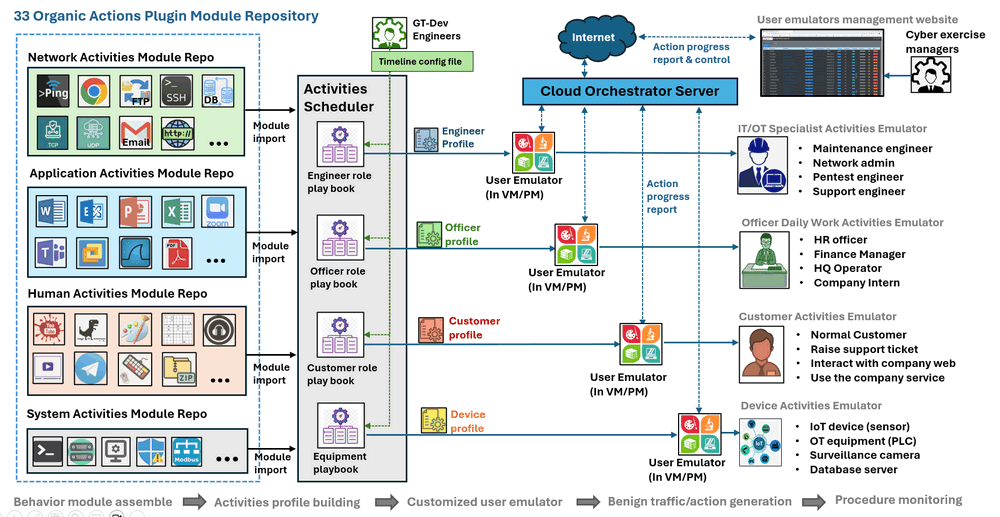
By assigning different playbooks and profiles, the CUE System can emulate a wide range of users and devices commonly found in enterprise and industrial environments.
2.2.1 IT and OT Specialists
| Function Description | Simulated Roles | Simulated activities |
|---|---|---|
| Simulates technical personnel responsible for maintaining enterprise and industrial infrastructure | Maintenance Engineers, Network Administrators, Penetration Test Engineers, IT Support Engineers, Network Administrators | SSH login, PLC programming, database maintenance, network diagnostics, software deployment, and remote administration |
2.2.2 Enterprise Office Staff
| Function Description | Simulated Roles | Simulated activities |
|---|---|---|
| Daily office employees performing routine business operations | Human Resources Officers, Finance Managers, Finance Managers, Headquarters Operators, Company Interns | Doc editing, spreadsheet processing, presentation preparation, email communication, file sharing, printing, web browsing, and video conferencing. |
2.2.3 Customer Activities
| Function Description | Simulated Roles | Simulated activities |
|---|---|---|
| External users interacting with enterprise services | Normal Users | Accessing company websites, Registering user accounts, Raising support tickets, Using online services, Downloading resources |
2.2.4 Device Emulation
| Function Description | Simulated Roles | Simulated activities |
|---|---|---|
| Emulate autonomous devices and industrial equipment | IoT sensors, PLCs and RTUs, Surveillance cameras, Database servers, Edge computing devices | Protocol-specific traffic and operational behaviors that closely resemble real-world deployments. |
2.3 Malicious Activity and Traffic Generation
Besides generating normal enterprise activities, the CUE System can also emulate adversarial behaviors, malware execution, and automated cyber attacks. The malicious activity workflow is shown below.
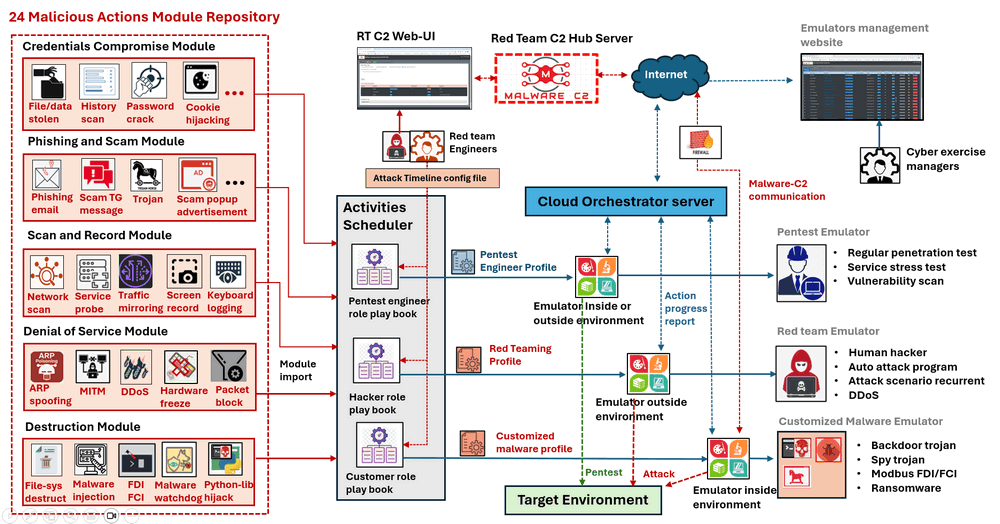
Different attacker profiles can represent human hackers, automated attack tools, malware samples, or command-and-control (C2) agents.
2.3.1 Penetration Testing
| Function Description | Simulated Roles | Simulated activities |
|---|---|---|
| Validate security controls and identify weaknesses before production deployment | Pentest engineer | Network vulnerability scanning, Service enumeration, Authentication testing, Service stress testing |
2.3.2 Red Team Operations
| Function Description | Simulated Roles | Simulated activities |
|---|---|---|
| Attack playbooks can reproduce sophisticated offensive campaigns involving multiple stages of the cyber kill chain. | Red team attacker. simulated hacker | Initial access, Credential harvesting, Privilege escalation, Lateral movement, Persistence establishment, Command-and-Control (C2) communication, Data exfiltration, Distributed Denial-of-Service (DDoS) attacks |
2.3.3 Customized Malware Emulation
| Function Description | Simulated Roles | Simulated activities |
|---|---|---|
| Simulate malware behaviors without requiring live malware samples. | Malware and Malicious payload | Remote Access Trojans (RATs), Backdoor Trojans, Spyware, Ransomware, Modbus False Data Injection (FDI) |
3. Design of Activities Generation Modules Repository
The Activities Generation Modules Repository provides an extensible collection of reusable plugin modules that generate both benign and malicious activities across multiple layers of a computing environment. The repository follows a plugin-based architecture, allowing new activity modules to be developed and integrated independently without modifying the core emulator. Each plugin encapsulates a specific activity or behavior and can be combined with other plugins through user-defined playbooks to construct complex, repeatable workflows. The system components diagram is shown below:
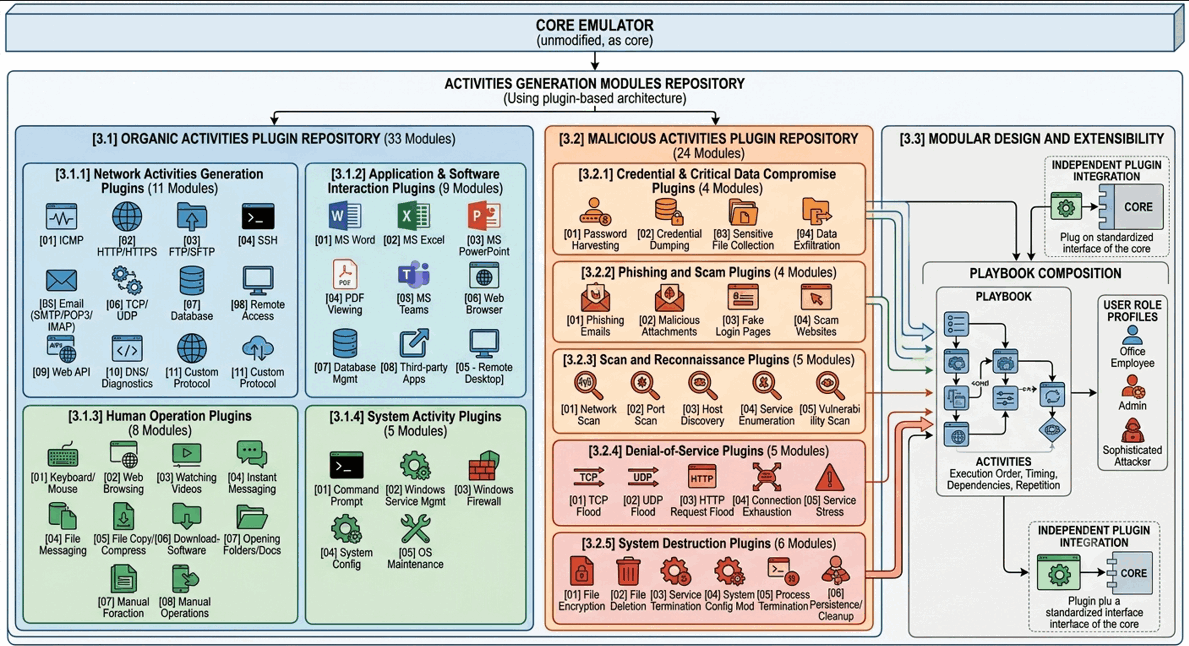
Typical activities supported by the repository include:
-
Sending and receiving emails
-
Joining online meetings
-
Uploading and downloading files
-
Editing Microsoft Office documents
-
Web browsing and online searches
-
Playing online or offline multimedia
-
Executing command-line utilities
-
Managing databases and remote servers
-
Enabling or disabling Windows Firewall
-
Transferring files through various network protocols
-
Executing scheduled background tasks
-
Simulating industrial control system communications
3.1 Organic Activities Plugin Repository
The Organic Activities Plugin Repository contains 33 reusable plugin modules that emulate legitimate day-to-day activities performed by enterprise users, administrators, and devices. These modules generate realistic operating system events, application logs, and network traffic, providing valuable datasets for Digital Forensics and Incident Response (DFIR), cybersecurity training, AI/ML research, and cyber range exercises.
3.1.1 Network Activities Generation Plugins (11 Modules)
These modules generate network communications using common enterprise protocols and services.
-
Typical examples include:
[01] ICMP (Ping),[02] HTTP / HTTPS,[03] FTP / SFTP,[04] SSH,[05] Email protocols (SMTP, POP3, IMAP),[06] TCP and UDP communications,[07] Database connections,[08] Remote service access,[09] Web API interactions,[10] DNS and network diagnostics,[11] Custom protocol simulation.
3.1.2 Application and Software Interaction Plugins (9 Modules)
These plugins automate interactions with commonly used desktop and enterprise applications.
-
Example activities include:
[01] Microsoft Word document editing,[02] Microsoft Excel spreadsheet processing,[03] Microsoft PowerPoint presentation editing,[04] PDF viewing,[05] Microsoft Teams collaboration,[05] Remote Desktop usage,[06] Web browser automation,[07] Database management software,[08] Third-party desktop applications.
3.1.3 Human Operation Plugins (8 Modules)
Human operation plugins emulate the actions of real users interacting with their workstations.
-
Typical activities include:
[01] Keyboard and mouse operations,[02] Web browsing,[03] Watching online or offline videos,[04] Instant messaging,[05] File copying and compression,[06] Downloading software,[07] Opening folders and documents,[08] Manual application operations.
3.1.4 System Activity Plugins (5 Modules)
System activity plugins interact directly with the operating system and system services.
-
Example activities include:
[01] Command Prompt execution,[02] Windows service management,[03] Windows Firewall configuration,[04] System configuration changes,[05] Operating system maintenance tasks.
3.2 Malicious Activities Plugin Repository
The Malicious Activities Plugin Repository currently contains 24 plugin modules designed to emulate adversarial behaviors, cyber attacks, and malware operations within isolated environments. Rather than deploying real malware, these plugins safely reproduce attack techniques and malicious traffic patterns for cybersecurity research, penetration testing, DFIR training, and defensive validation.
3.2.1 Credential and Critical Data Compromise Plugins (4 Modules)
These plugins simulate attacks targeting sensitive credentials and confidential information.
-
Typical activities include:
[01] Password harvesting,[02] Credential dumping,[03] Sensitive file collection,[04] Data exfiltration preparation.
3.2.2 Phishing and Scam Plugins (4 Modules)
These plugins reproduce common social engineering attacks used by adversaries.
-
Example simulations include:
[01] Phishing emails,[02] Malicious attachment delivery,[03] Fake login pages,[04] Scam website interactions.
3.2.3 Scan and Reconnaissance Plugins (5 Modules)
These modules emulate reconnaissance activities commonly performed before launching an attack.
-
Typical examples include:
[01] Network scanning,[02] Port scanning,[03] Host discovery,[04] Service enumeration,[05] Vulnerability scanning.
3.2.4 Denial-of-Service Plugins (5 Modules)
These plugins generate abnormal traffic intended to evaluate system resilience and defensive mechanisms.
-
Supported simulations include:
[01] TCP flooding,[02] UDP flooding,[03] HTTP request flooding,[04] Connection exhaustion,[05] Service stress testing.
3.2.5 System Destruction Plugins (6 Modules)
These plugins emulate destructive malware behaviors and post-compromise activities.
-
Examples include:
[01] File encryption simulation,[02] File deletion,[03] Service termination,[04] System configuration modification,[05] Process termination,[06] Persistence and cleanup activities.
3.3 Modular Design and Extensibility
The Activities Generation Modules Repository is designed to be modular, extensible, and reusable. Every activity is implemented as an independent plugin with a standardized interface, allowing developers to add new behaviors without affecting existing modules or the core emulator.
Multiple plugins can be assembled into playbooks, which define the execution order, timing, dependencies, and repetition rules for a specific user role or attack scenario. This modular composition enables users to rapidly create highly customized activity profiles ranging from ordinary office employees and industrial devices to sophisticated attackers and malware.
Repository : https://github.com/LiuYuancheng/Cluster_User_Emulation_System/blob/main/ReadMe_User_Actions_Repository.md
4. Design of User Action Emulator
The User Action Emulator is the execution engine of the Cluster User Emulation (CUE) System. It is responsible for transforming user-defined activity profiles into realistic user, device, or attacker behaviors on target machines. By loading activity modules and execution playbooks generated by the Activities Scheduler, the emulator can accurately reproduce day-to-day user operations, automated system processes, industrial device communications, and cyber attack activities.
The User Action Emulator consists of two major functional modules:
-
Activities Scheduler Module
-
Action Emulator Module
4.1 Activities Scheduler Module
The Activities Scheduler Module is responsible for assembling activity modules and generating executable user profiles. Based on the user's timeline configuration, the scheduler imports the required plugin modules from the Activities Generation Modules Repository and combines them into a structured playbook. The playbook defines the execution order, timing, repetition rules, and dependencies between activities. The Activities Scheduler performs the following functions:
-
Import activity modules from the repository
-
Parse timeline configuration files
-
Build role-specific playbooks
-
Resolve activity dependencies
-
Configure execution schedules
-
Generate reusable Emulator Profiles
-
Deploy profiles to User Action Emulators
4.2 Action Emulator Module
The Action Emulator Module is the runtime execution engine responsible for interpreting and executing Emulator Profiles.
Each emulator instance loads a profile generated by the Activities Scheduler and assumes the corresponding role within the simulated environment. During execution, it follows the playbook instructions, invokes the required activity modules, records execution results, and periodically reports its status to the System Orchestrator. Depending on the profile configuration, the Action Emulator can generate:
-
Human user activities
-
Software application interactions
-
Automated system operations
-
Device communications
-
Malware behaviors
-
Network traffic
-
Randomized background activities
-
Scheduled daily, weekly, or monthly workflows
4.3 Hierarchical Component Architecture
To maximize flexibility and code reuse, the User Action Emulator adopts a four-level hierarchical component architecture, as shown below :
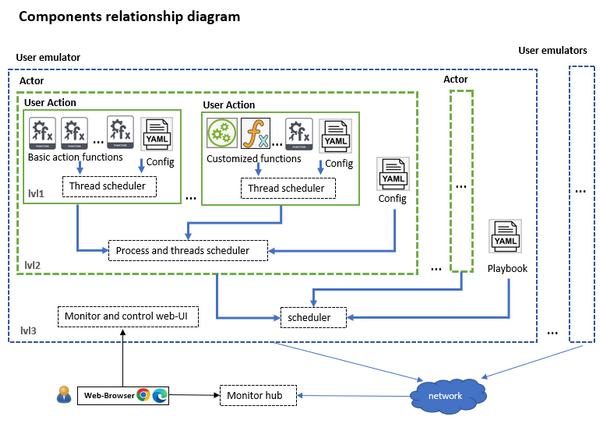
4.3.1 Level 0 – Basic Action Functions
| Feature Description | Typical examples |
|---|---|
| The Basic Action Function layer forms the foundation of the emulator. Each component performs a single atomic operation and serves as the smallest reusable building block within the system. | Sending an HTTP or TCP request, Copying or moving a file, Executing an operating system command, Opening an application, Typing keyboard input, Performing mouse operations, Reading or writing a file, Establishing an SSH connection |
4.3.2 Level 1 – User Actions
| Feature Description | Typical examples |
|---|---|
| A User Action combines multiple Basic Action Functions together with a configuration file to perform a complete business task. | Sending and receiving emails, Uploading files to a cloud service, Downloading software, Joining an online meeting, Logging into a remote server, Updating database records, Editing a Microsoft Word document |
4.3.3 Level 2 – Actors
| Feature Description | Typical examples |
|---|---|
| An Actor represents a complete user persona by combining multiple User Actions into a realistic workflow. Each Actor includes its own schedule configuration, allowing activities to be executed in a logical order that mimics normal human behavior. | Network Administrator, Maintenance Engineer, Office Employee, Finance Officer, Customer, Database Administrator, Industrial Operator, Malware Process |
4.3.4 Level 3 – User Emulator
| Feature Description | Typical examples |
|---|---|
| The User Emulator represents the highest abstraction layer within the architecture. It schedules one or more Actors according to a customized timeline, enabling the simulation of complete daily, weekly, or monthly behavior patterns. | An IT administrator, An HR officer, A Finance manager, A Factory operator, An IoT gateway, A PLC controller, A Customer workstation, A Malware-infected host |
By offering these hierarchical levels of components, the User Actor Emulator provides a flexible framework for building and implementing diverse user scenarios, catering to a wide range of customer requirements.
The detail document link of User Action Emulator https://github.com/LiuYuancheng/Cluster_User_Emulation_System/blob/main/ReadMe_User_Actions_Emulator.md
5. Design of System Orchestrator
The System Orchestrator is the centralized management and coordination platform of the Cluster User Emulation (CUE) System. It is responsible for managing distributed User Action Emulators, collecting their execution status, coordinating task deployment, and providing operators with a unified web-based interface for monitoring and controlling cyber range activities.
In addition to centralized monitoring, the Orchestrator also provides remote task management, enabling operators to start, stop, pause, or modify emulator activities without requiring direct access to the target machines. This centralized architecture greatly simplifies the administration of large-scale cyber exercises and ensures consistent execution across distributed environments. The System Orchestrator provides two primary web-based management interfaces:
-
Emulator Procedure Management Interface
-
Malware Command and Control (C2) Interface
5.1 Emulator Procedure Management Interface
The Emulator Procedure Management Interface serves as the primary dashboard for monitoring and managing all connected User Action Emulators. The management UI is shown below:
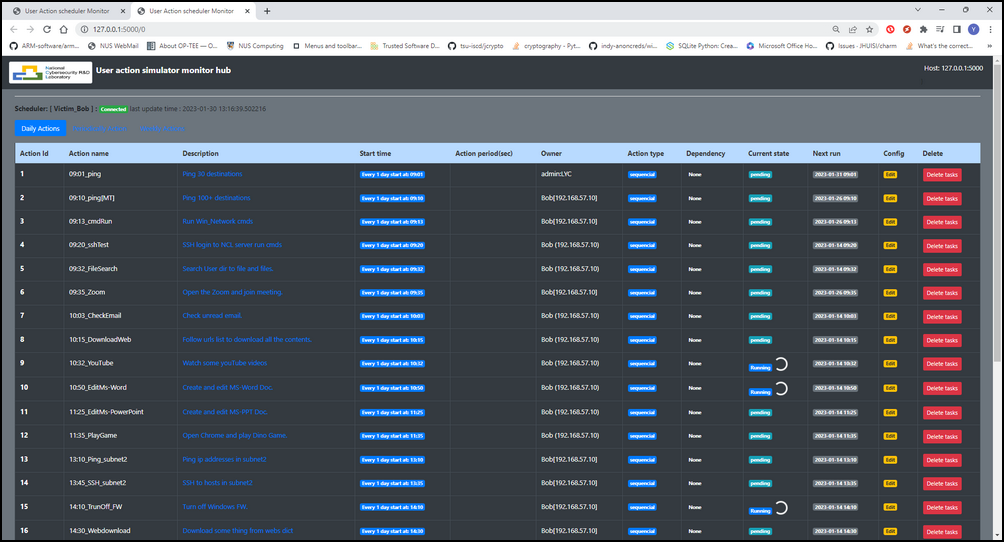
Each emulator continuously uploads its execution status to the Orchestrator, allowing operators to observe the progress of scheduled tasks, verify emulator health, and identify failed or delayed activities. This centralized dashboard provides complete visibility into the execution state of the distributed emulation environment, making it especially valuable during cyber range exercises, penetration testing campaigns, and automated security validation.
The interface provides real-time information including:
-
Connected emulator status
-
Current execution state
-
Running and pending tasks
-
Scheduled activity timelines
-
Execution progress
-
Task completion status
-
System health information
-
Activity execution history
5.2 Malware Command and Control (C2) Interface
In addition to managing benign user activities, the System Orchestrator also provides a dedicated Malware Command and Control (C2) Interface for offensive security exercises. The malware C2 UI is shown below:
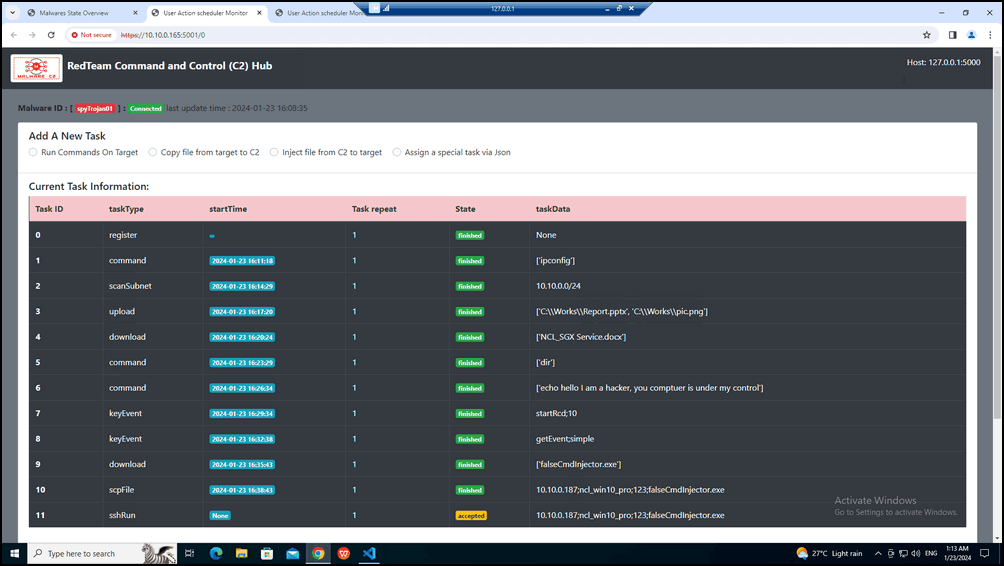
This interface monitors all active malware emulation instances and provides a secure Web API that allows authorized Red Team operators to dynamically control malware behaviors during cyber exercises.
Typical management functions include:
-
Deploying malware playbooks
-
Starting and stopping malware execution
-
Triggering attack stages
-
Updating malware configurations
-
Monitoring malware execution status
-
Collecting execution reports
-
Coordinating multi-stage attack scenarios
5.3 Emulator Action Management Features
The web-based management interface provides several operational features that simplify emulator administration and activity management.
-
Real-time Activity Monitoring : Users can monitor the execution status of all scheduled activities in real time, including both one-time and recurring tasks.
-
Task Lifecycle Management : Users can deactivate or remove selected actions from the execution queue, enabling rapid adjustment of simulation scenarios during an exercise.
-
Support for Multiple Scheduling Modes : The dashboard distinguishes between recurring activities, such as daily or weekly office routines, and randomly generated background activities that emulate natural user behavior.
The detail document link of Scheduler Monitor Hub: https://github.com/LiuYuancheng/Cluster_User_Emulation_System/blob/main/ReadMe_Scheduler_Monitor_Hub.md
6. Conclusion
The Cluster User Emulation (CUE) System establishes a robust and versatile framework for generating realistic cyber environments through behavior-driven activity emulation. By shifting the focus from simple network traffic generation to the simulation of complete user workflows, attacker operations, and defensive responses, it provides an invaluable toolkit for a wide spectrum of cybersecurity applications. Its modular architecture, extensive plugin repository, and centralized orchestration empower users to create repeatable, scalable, and customizable scenarios for DFIR research, security validation, training, and AI/ML development. Ultimately, CUE serves as a critical asset for enhancing cyber preparedness, bridging the gap between theoretical knowledge and practical operational experience in a safe, controlled environment.
Thanks for spending time to check the article detail, if you have any question and suggestion or find any program bug, please feel free to message me. Many thanks if you can give some comments and share any of the improvement advice so we can make our work better ~

No comment for this article.