
WAMP server is a platform tool for serving PHP applications on Windows. It includes a combination of Apache, MySQL and PHP service which can help developers test or run PHP applications with minimal setup.
Sometimes one would first have a 32 bit version of WAMP installed and a few applications have been configured. But later s/he would mistakenly installed a 64 bit version of WAMP and somehow the 32 bit version configuration is overwritten. This causes a problem where the old applications configured for 32 bit WAMP will not function any more even if the 32 bit version of WAMP server is started.

The reason for this is that the 32 bit version wampmanager.conf is overwritten and all services are pointing to the 64 bit version services. Hence even if the 32 bit version WAMP server is started, the services started are 64 bit indeed.
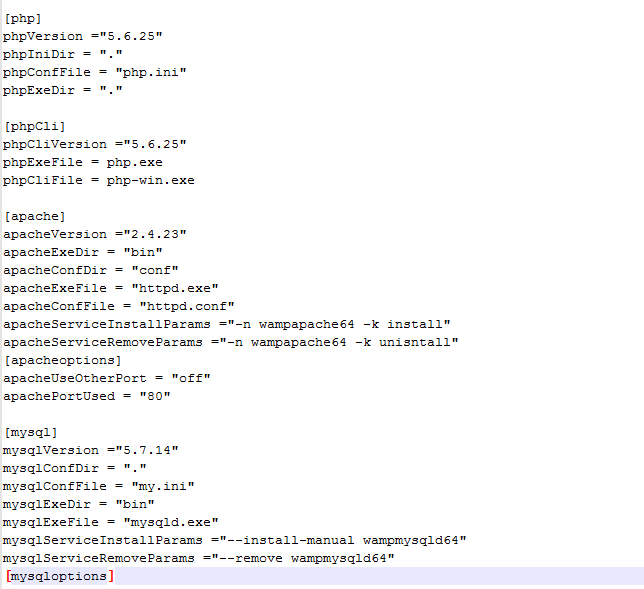
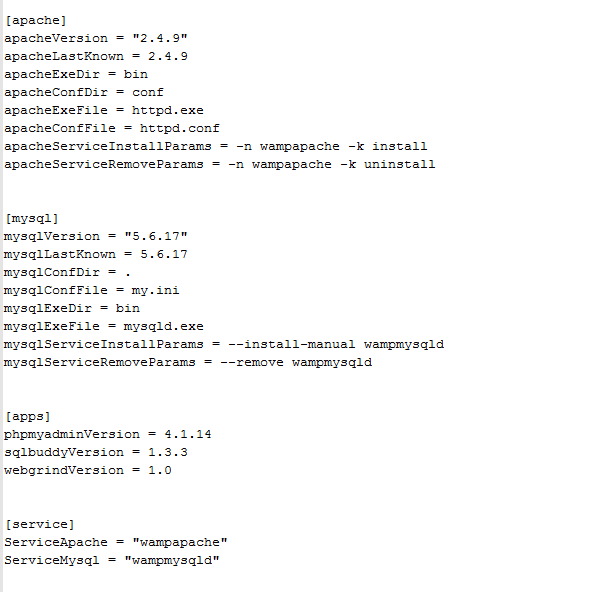
To recover the 32 bit version applications, only the configuration file needs to be updated to point to 32 bit service again. In C:\wamp, change the wampmanager.conf to below.
Now start the 32 bit wampmanager.exe in C:\wamp and n the desktop tray, the red icon would appear which indicates one or more services are not up. In this case, the service may need to be reinstalled. Click the red icon and select each service on the menu and click Install Service.
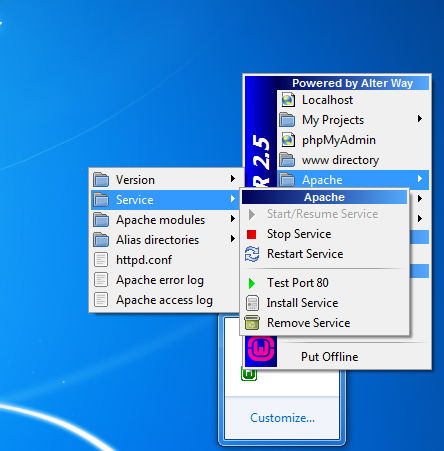
Restart all the services and the icon will become green and the old applications can be accessed.

No comment for this article.