Which program is using USB device?

Summary

When encountering issues safely removing a USB device due to active processes, Windows' Resource Monitor offers a direct method for identification. Developers can access Resource Monitor, typically found under System Tools, and navigate to the CPU tab. Within this tab, the "Associated Handler" search field allows users to input the USB device's assigned drive letter. This action will reveal the specific processes currently utilizing the device, enabling users to determine which applications are preventing safe ejection.

Sometimes when we want to plug out our USB device, but the operating system tells us we cannot plug it out since some other processes are using the USB device. How do we know which process is using our USB device. Here is a simple solution.

First, go to Start->All programs->Accessories->System Tools->Resource Monitor. (as in Windows 7, for other Windows systems, you may similar program called Resource Monitor but may not in the same location as in Windows 7).

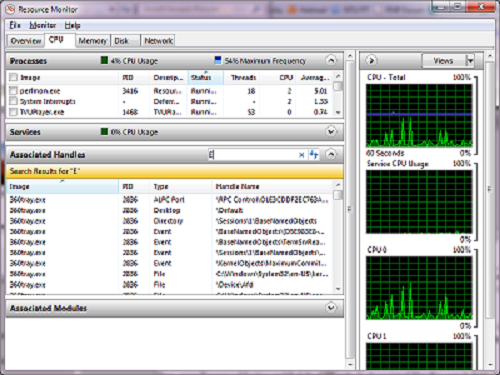
Then, open Resource Monitor and find the CPU tab. In Associated Handler search field. Type in the driver letter to find the handlers which are using the USB device. For example, the USB device has drive letter E, then type 'E' in the search field. You can find it.

Resource monitor :


WINDOWS.ISB DEVICE PLUGOUT PROBLEM SOLUT

  RELATED

  COMMENTS

0

No comment for this article.