
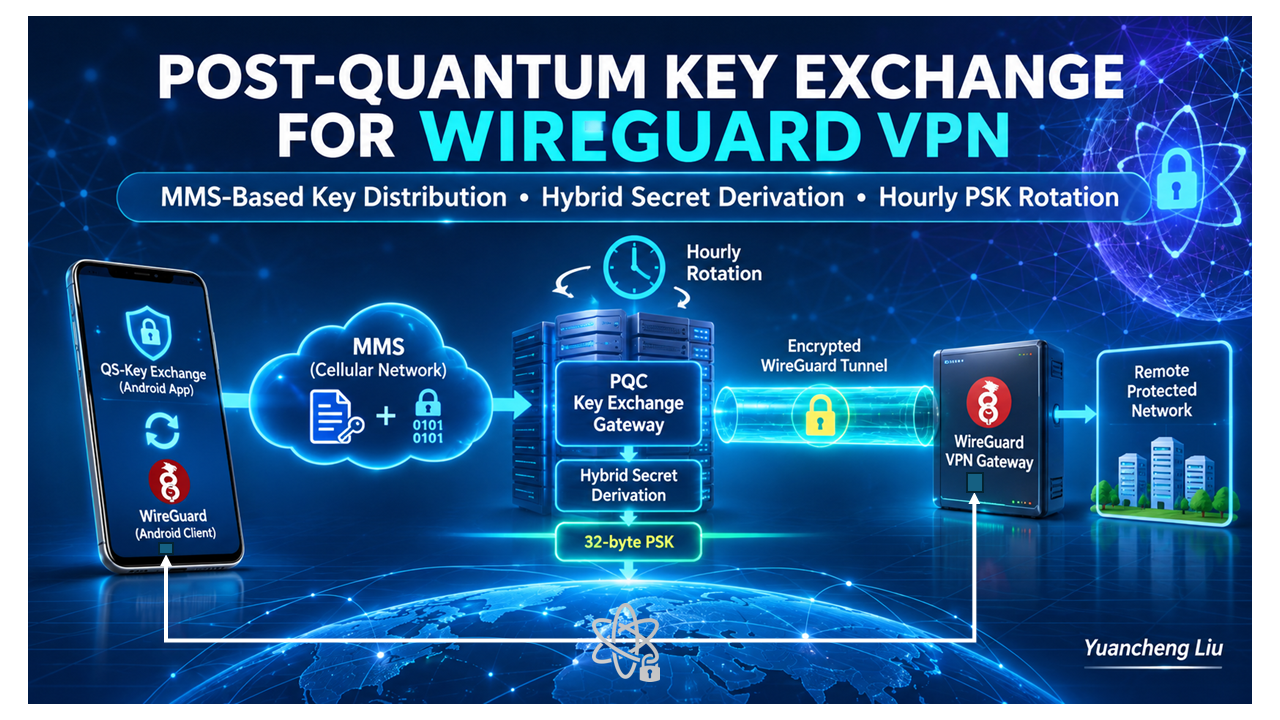
Developing a Post-Quantum Key Exchange Extension for WireGuard VPN Using MMS-Based Key Distribution
This article is about a PQC key exchange project I developed five years ago. The project aimed to add a Post-Quantum Key Encapsulation Mechanism (PQC-KEM) to WireGuard VPN, allowing an Android phone to exchange the PQC public-key information through the phone Multimedia Messaging Service (MMS) channel with the Hybrid Secret Derivation service. WireGuard could then use an hourly rotated key to establish a hybrid post-quantum-protected connection to a quantum safe VPN gateway. For the KEM component, the project adopts the concepts introduced in the research paper "Stateful KEM: Towards Optimal Robust Combiner for Key Encapsulation Mechanism".
Note: As the project is developed in 2021 and it is just a POC program, so there are some old features which may not match the current standard such as the KEM algo BIKE and FrodoKEM used in the program described as NIST Round-3 PQC algorithms but now they are historical candidates, not current NIST-approved KEM standards. And as a minimum viable product (MVP), we assume the MMS is one safety isolated challenge to identify the mobile device.
# Author:      Yuancheng Liu
# Created:     2026/11/21
# Version:     v_0.0.1
# Copyright:   Copyright (c) 2026 Liu Yuancheng
# License:     GNU General Public License V3
1. Introduction
The project is designed to integrate post-quantum cryptographic protection into the existing WireGuard VPN architecture while avoiding extensive modifications to the original WireGuard source code.
The main idea was to separate the PQC key exchange functionality from the VPN tunnel implementation. Instead of embedding the complete PQC algorithm into WireGuard, an independent Android application would handle the key exchange with a corresponding server-side service. The resulting shared secret would then be supplied to the WireGuard VPN application as an additional cryptographic input.(As shown in the below comparison diagram)
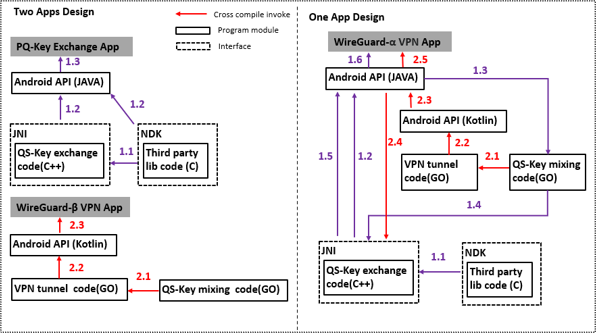
This two App approach has several advantages:
-
Minimize modifications to the existing WireGuard VPN implementation.
-
Keep the PQC key exchange algorithm independent of the VPN application.
-
Support different PQC KEM algorithms and hybrid key exchange strategies.
-
Use ordinary MMS messages as an alternative communication channel for PQC key provisioning.
-
Automatically generate and rotate VPN preshared keys every hour.
-
Allow the same PQC key exchange service to be integrated into other VPN applications.
2. Project Background and Design Concept
The original QS-VPN APPs project was designed around two independent Android applications:
-
QS-Key Exchange Android App: Responsible for executing the PQC key exchange algorithm and communicating with the QS-Key Exchange Server.
-
WireGuard-β QS-VPN Client Android App: Responsible for establishing the VPN tunnel and integrating the exchanged quantum-safe shared secret into WireGuard's cryptographic key establishment process.
Both applications run independently on the Android device and communicate through protected local application data.
2.1 System Design Concept
The system is designed by following below concept:
2.1.1 Development complexity
The PQC key exchange implementation was developed using C and C++, while the WireGuard Android application primarily used Kotlin and Go. Separating the two applications avoided complicated cross-language integration between native C/C++ libraries, JNI, Go and Kotlin.
2.1.2 Software maintenance and modularity
The PQC key exchange service could be maintained independently from the WireGuard application. This also made it possible to reuse the key exchange component in other applications without extensively modifying the original source code.
2.1.3 Minimizing modifications to WireGuard
The WireGuard application only needed additional functionality to obtain the generated shared secret and configure the VPN's preshared key. The PQC implementation did not need to become part of WireGuard's native Noise handshake implementation.
3. Overall System Architecture
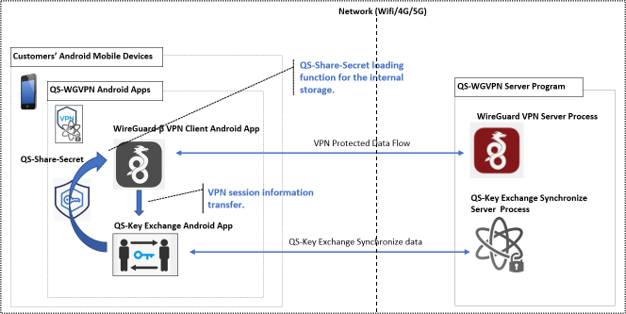
The QS-VPN App system architecture contains four major components as shown in the below diagram:
-
Android QS-Key Exchange App
-
Android WireGuard VPN Client App
-
PQC Key Exchange Gateway
-
WireGuard VPN Gateway
The PQC Key Exchange Gateway and WireGuard VPN Gateway can operate on the same server or on separate machines.
3.1 Android QS-Key Exchange App
The QS-Key Exchange App is responsible for managing the PQC key exchange process on the mobile device.
Its main functions include:
-
Generating and managing local cryptographic parameters.
-
Receiving the gateway's PQC public-key package through MMS.
-
Validating the public-key package and its authentication information.
-
Executing the KEM encapsulation operation.
-
Generating the shared secret.
-
Sending the KEM ciphertext and exchange metadata to the gateway through MMS.
-
Maintaining the state required by the Stateful KEM protocol.
-
Generating a new VPN preshared key for each rotation period.
-
Providing the resulting key to the WireGuard application through a protected local interface.
The PQC cryptographic implementation can be developed in C/C++ and integrated into the Android application through the Java Native Interface (JNI).
This retains the original project's approach of using native C/C++ libraries for computationally intensive cryptographic operations.
3.2 Android WireGuard VPN Client App
The WireGuard application is responsible for establishing and maintaining the VPN tunnel. The modification is limited to the application-level configuration and key management functions:
-
Obtain the latest PQC-derived 32-byte preshared key.
-
Update the WireGuard peer configuration.
-
Initiate a new WireGuard handshake after key rotation.
-
Monitor VPN connection status.
-
Record the active key generation number and expiration time.
The recommended implementation is to use WireGuard's existing PresharedKey configuration field rather than directly modifying its internal Noise handshake or transport encryption implementation.
This is an important design consideration because WireGuard already supports an optional 32-byte preshared key that is mixed into its existing Noise handshake.
Consequently, the PQC extension can reuse this native capability without introducing a new VPN handshake packet format.
3.3 PQC Key Exchange Gateway
The PQC Key Exchange Gateway is the server-side counterpart of the Android QS-Key Exchange App. Its responsibilities include:
-
Managing gateway-side KEM public and private keys.
-
Maintaining the Stateful KEM protocol state.
-
Receiving and validating MMS exchange messages.
-
Executing the KEM decapsulation operation.
-
Generating the same shared secret as the Android client.
-
Maintaining the current and next VPN preshared keys.
-
Verifying the exchange transcript and key agreement.
-
Coordinating hourly key rotation with the WireGuard VPN Gateway.
The gateway should also maintain a secure mapping between each registered Android device, its WireGuard peer identity and its current KEM state.
3.4 WireGuard VPN Gateway
The WireGuard VPN Gateway runs the original WireGuard VPN service. Its main responsibility is to accept authenticated VPN connections from registered clients.
The gateway receives the newly generated PQC-derived preshared key from the PQC Key Exchange Gateway and updates the corresponding WireGuard peer configuration.
The existing WireGuard handshake and encrypted data transport remain unchanged.
4. MMS-Based PQC Key Exchange
One of the main features of the proposed design is using hone Multimedia Messaging Service (MMS) as the communication channel for exchanging PQC KEM information. The Key exchange progress is shown below:
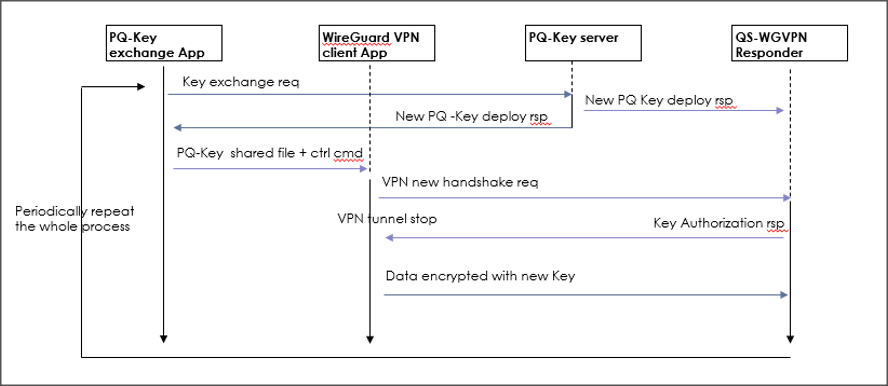
Unlike a conventional key exchange implementation that requires an IP-based connection to a dedicated key exchange server, the MMS approach allows the mobile device to exchange key material through the mobile telecommunications network.
This is particularly useful when the VPN tunnel has not yet been established or when an independent communication channel is desirable.
4.1 PQC Public-Key Distribution
The PQC Key Exchange Gateway generates its KEM key pair and distributes the public-key package to the registered Android device. The private key remains securely stored at the gateway. The public-key package contains:
-
Gateway identification.
-
KEM algorithm identifier and parameter set.
-
Public key.
-
Key generation identifier.
-
Validity period.
-
Authentication signature or other verifiable authentication information.
The Android application receives the public-key package through MMS and verifies its authenticity before using it.
4.2 KEM Encapsulation and Ciphertext Exchange
After receiving and verifying the gateway's public key, the Android application performs the KEM encapsulation operation.
The KEM generates two outputs:
-
Ciphertext: sent to the gateway.
-
Shared secret: retained locally by the Android application.
The ciphertext is transmitted to the PQC Key Exchange Gateway through MMS. The gateway uses its corresponding private key to perform decapsulation and recover the same shared secret.
The shared secret itself is never transmitted through MMS.
This is the main security advantage of using a KEM: both parties can establish the same secret over a communication channel without sending the secret itself.
4.3 MMS Message Authentication and Protection
Although the public key and KEM ciphertext do not need confidentiality, their authenticity and integrity are important.
MMS should therefore be treated as an untrusted transport channel. The proposed implementation should include:
-
Device and gateway identity verification.
-
Digital signatures or an authenticated bootstrap mechanism.
-
Exchange identifiers and key generation numbers.
-
Timestamps and expiration periods.
-
Replay protection.
-
Message fragmentation and integrity verification.
-
Protection against MMS sender spoofing and message substitution.
An important point is that MMS delivery does not automatically authenticate the sender. The initial gateway identity and public-key fingerprint must be authenticated independently, for example through a pre-established trust anchor or digital signature.
5. QS-Key Exchange Android App
5.1 App Setup and Interface
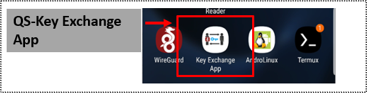
The key exchange android App will pass the exchanged PQ-Shared-Secret into the WireGuard-β QS-VPN Client Android App to generate the final QS-Key for data encryption. After installed the APK file, the App will show in the mobile device as below
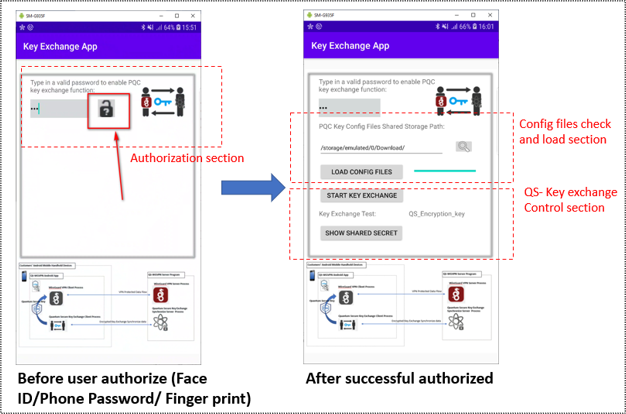
After executed the QS-Key Exchange Android App, the program main UI is shown below When the user wants to enable the QS-key exchange function, he needs to input a valid password for authorization and press the “unlock” button to enable all the functions. Then the use can press the “START KEY EXCHANGE” button to initialize the QS-Share-Secret exchange progress. The config files auto search and verify function are also provided in the App
5.2 App Development Detail
5.2.1 Development Environment
Program development language: Java, C, C++
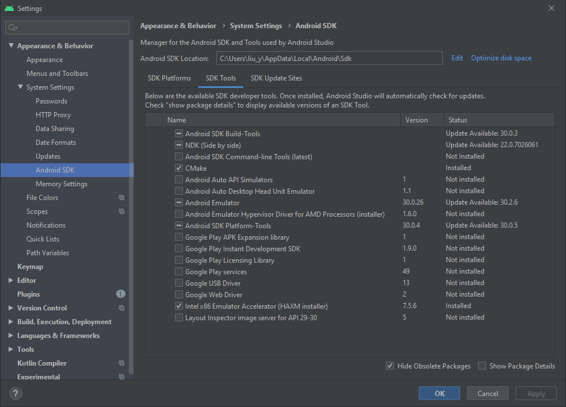
Android App development environment:
-
Cross compile environment: CMake + NDK (Android API-29 version Android 11)
-
Supported CPU ABI and OS-version: arm64-v8a + x86_64; Android OS 8, 10, 11
5.2.2 Function Modules
The design of QC-Key Exchange Android App contents three main sections:
-
App User-Interface: Main App user interface and all related user-oriented functions (such as checking and loading config file, user authorization, developer debug mode enable …) are developed by using Java and Android API.
-
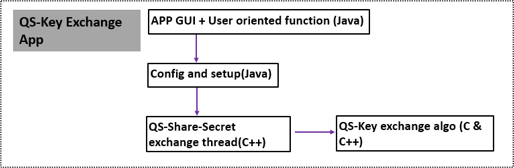
PQ-Share-Secret Exchange Function: Compile the QS-Key management program to a native-C library by using Android NDK, wrap it with JNI function and call/pass needed parameters from the main App UI’s Java function. Then access the phone MMS data to get the key exchange information.
-
Integration of Third-party C/C++ libs: Use Android NDK to recompile all the QS-Key management program used open-source library shown in the introduction section 1.3.x to static lib file which are compatible for Android CPU ABI arm64-v8a and x86-64.
5.2.3 Modules Invoke Sequence The control flow of different modules listed in the previous section of QS-Key Exchange Android App follows below module invoke sequence (As shown in Figure 8, arrow represents ”invoked relationship”: source module will use interface function to invoke the arrow target module):
6. Integration with WireGuard VPN
A key objective of the project is to introduce PQC protection without making significant modifications to the original WireGuard VPN implementation. WireGuard already supports an optional preshared key (PSK), which is incorporated into its Noise-based handshake. We use the local storage for the key transfer from the key exchange App to the wiregurad VPN app:
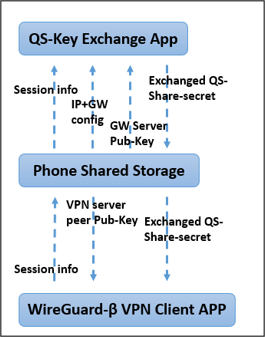
This provides a convenient integration point for the PQC-derived shared secret.
6.1 WireGuard Preshared Key Integration
The proposed design uses the following process:
-
The Android QS-Key Exchange App completes the PQC key exchange.
-
The Android application derives a 32-byte session-specific VPN PSK.
-
The PSK is passed to the WireGuard Android application through a protected local interface.
-
The WireGuard application updates the corresponding peer's
PresharedKeyconfiguration. -
The PQC Key Exchange Gateway derives the same PSK and updates the corresponding server-side WireGuard peer configuration.
-
Both sides initiate or accept a fresh WireGuard handshake using the updated PSK.
The PSK is mixed into the existing WireGuard Noise handshake, providing an additional secret contribution to the handshake key derivation. This approach avoids changing the WireGuard packet format, transport encryption algorithm or core Noise handshake implementation.
6.2 Minimizing WireGuard Source Code Modifications
The recommended changes to the WireGuard Android application are limited to three areas:
-
Application interface : Add a PQC key management interface to obtain the latest preshared key and display its generation and expiration status.
-
Key configuration management : Update the existing WireGuard peer configuration using the supported configuration and tunnel management interfaces.
-
Automatic key rotation : Implement a background key management service that monitors the PQC key generation schedule and updates the WireGuard configuration when a new key becomes available.
The server-side WireGuard service can similarly use its existing peer configuration management interface to update the preshared key. This is preferable to directly modifying the internal WireGuard session-key chain or inserting a secret into a kernel memory location.
7. WireGuard-β QS-VPN Client Android App
7.1 App Setup and Interface
The WireGuard-β QS-VPN Client Android App is modified from WireGuard VPN Client Android App. We have integrated the QS-Key in the WireGuard’s data encryption key chain so all the VPN communication data will be protected. WireGuard VPN is an open-source VPN software, so we named our modified version as a “β” branch of it based on its “Trademark Usage Policy”. After installed the APK file, the App will show in the device as below :

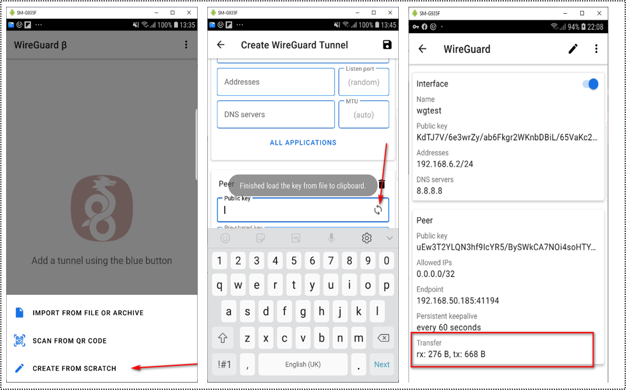
The main App’s user interface is shown below. When the user starts the WireGuard- β QS-VPN Client Android App, the left “Service-Init-Page” will show. After user selected “Create a new from scratch” in the Init page, the App will switch to the mid “Interface-Configuration-Page”, the user needs to fill up the related server information. After the user finished config and start the VPN, if the QS-Key Exchange App finished the QS-Share-Secret generation and insert, the VPN will start to work. The total size of data transmitted (tx) and received (rx) through the VPN tunnel will show in the “Communication-State-Page” on the right.
7.2 App Development Detail
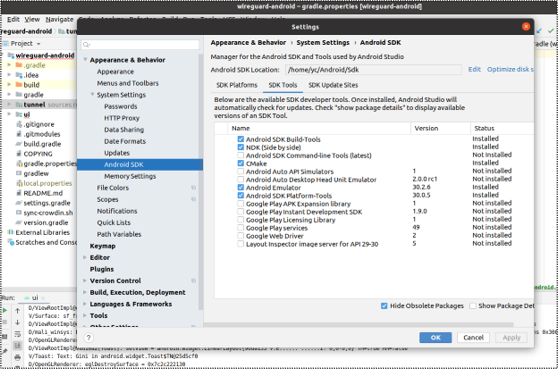
We will show the detail App development environment, main App’s function modules and the module invoke relationship in this section. 7.2.1 Development Environment Used programming language: Kotlin, Java, Golang, C, C++. Android development environment:
-
Cross compile Environment: CMake + NDK (Android API-29 version Android 11)
-
Supported CPU ABI and OS-version: arm64-v8a, armeabi-v7a, x86_64; Android OS 8 -11
7.2.2 Function Modules
The modification of WireGuard-β QS-VPN Client Android App compares with official WireGuard VPN Android App contents three main sections: App User-Interface change, VPN handshake session information record part and QS-Share-Secret loading + session key chain mixing part (QS-Key integration). The details are shown below:
-
Main App UI Modification: The main UI is programmed by Kotlin, we added the button to search and load the VPN server’s public key from key file which saved in the phone’s shared storage. (As marked in Interface-Configuration-Page of Figure 10)
-
VPN Handshake Session Information Record: The latest VPN handshake request session information will be saved to android phone’s shared storage ( Coded by Java).
-
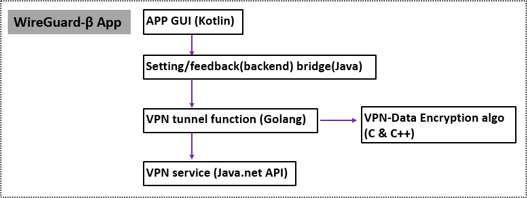
PQC-Key Integration: QS-Share-Secret will be inserted and mixed with the WireGuard VPN’s session key chain; this part was added in the WireGuard’s VPN tunnel function modules which are programmed by GoLang.
7.2.3 Modules Invoke Sequence The WireGuard-β QS-VPN Client Android App control flow of different modules listed in the previous section will follow below module invoke sequence (As shown in Figure 12 ,the arrow represents ”invoked relationship”: source module will use interface function to invoke the arrow target module):
7. Hourly PQC Key Rotation
The proposed system uses an hourly key rotation policy to reduce the exposure period of an individual VPN preshared key. The Android application and PQC gateway maintain a common key generation schedule.
Each generation is associated with a unique key identifier and validity period.
7.1 Key Rotation Workflow
The general workflow is:
-
The Android application requests or receives the next PQC key update.
-
The PQC gateway provides the relevant authenticated KEM public-key information.
-
The Android application executes the next Stateful KEM exchange round.
-
Both sides derive the same new session secret.
-
A key derivation function generates a new 32-byte WireGuard PSK.
-
Both sides verify the new key generation and prepare for activation.
-
At the agreed activation time, the client and gateway update their WireGuard PSK configurations.
-
A new WireGuard handshake establishes the VPN session using the new PSK.
-
The previous key is retired and securely erased when no longer required.
7.2 Key Derivation
The KEM shared secret should not simply be copied into the WireGuard configuration.
Instead, a cryptographic key derivation function should generate the final PSK.
For example:
WireGuard_PSK = HKDF-SHA-256(KEM_Shared_Secret, Context, 32)The context should bind the derivation to the device identity, gateway identity, VPN peer identities, protocol version and key generation number.
For a stateful robust combiner, the input must also reflect the protocol's specified accumulated state and session output rather than replacing its construction with an unrelated KDF operation.
The final output is a 32-byte value compatible with WireGuard's existing preshared-key configuration.
7.3 Synchronization and Recovery
Hourly key rotation requires both VPN peers to use the same PSK.
The implementation should therefore include:
-
A synchronized activation schedule.
-
Key generation identifiers.
-
Confirmation that both peers have prepared the new key.
-
A defined transition and timeout policy.
-
A recovery mechanism if one peer misses an update.
-
Secure retirement of expired keys.
WireGuard already performs its own regular handshake rekeying. The hourly PQC rotation is a separate key-provisioning process that updates the PSK used by subsequent WireGuard handshakes.
8. System Workflow and Security Limitations
8.1 System Workflow
The complete proposed QS-VPN workflow can be divided into four main stages as shown in the below diagram
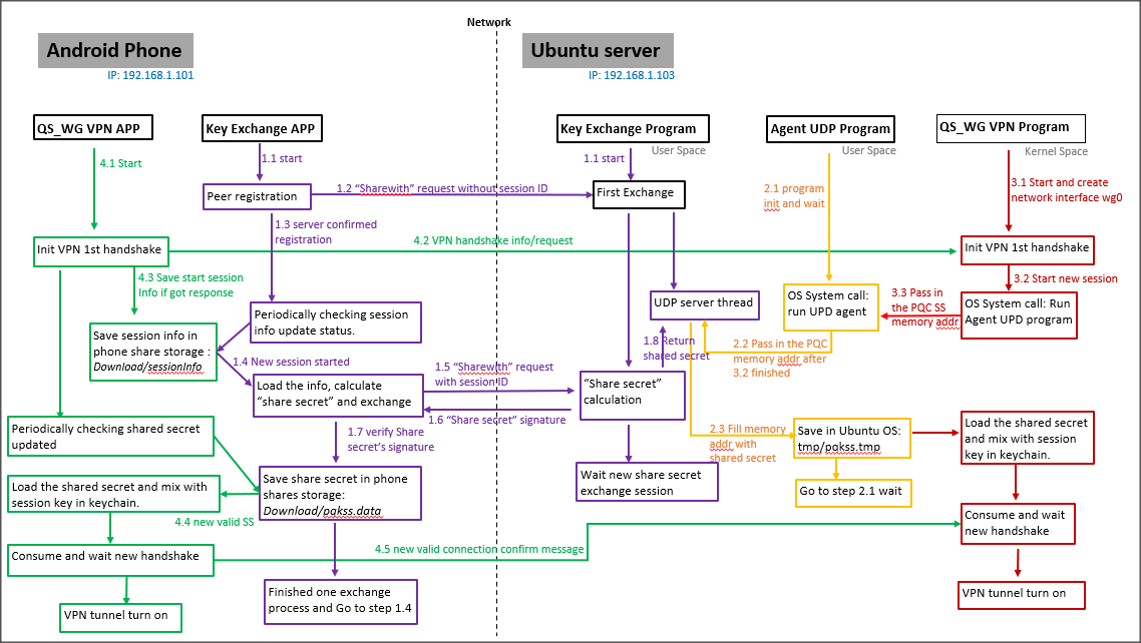
Stage 1: Initial Registration and Bootstrap
-
The Android QS-Key Exchange App registers the device with the PQC gateway.
-
The gateway establishes the device identity and distributes its authenticated PQC public-key package.
-
An initial trust anchor is required to authenticate the gateway and prevent public-key substitution.
Stage 2: PQC Key Exchange Through MMS
-
The Android application performs the KEM encapsulation operation and sends the ciphertext to the gateway through MMS.
-
The gateway performs decapsulation and derives the same shared secret.
-
Both parties establish and maintain the corresponding Stateful KEM state.
Stage 3: WireGuard VPN Establishment
-
The Android application derives the initial WireGuard PSK and passes it to the WireGuard application.
-
The gateway independently derives the same PSK and updates its WireGuard peer configuration.
-
The WireGuard VPN connection is then established using the normal WireGuard handshake.
Stage 4: Periodic PQC Key Rotation
-
Every hour, the Android application and gateway execute the next Stateful KEM update.
-
A new PSK is derived and activated on both WireGuard peers.
-
The previous PSK is retired, and the VPN continues operating with the new key.
8.2 Security and Limitations
Several security considerations should be addressed before deploying this architecture in a production environment.
-
MMS is not a secure authenticated transport by default : The public-key package and KEM ciphertext must be authenticated, and the system must protect against spoofing, replay and message substitution.
-
Stateful KEM requires synchronized state : Both devices must maintain consistent state across key exchange rounds. A missed MMS, device restart or lost state must not silently cause the peers to derive different keys.
-
The initial bootstrap must be authenticated : The first public-key exchange cannot rely on a previous Stateful KEM session. An independently trusted identity and authentication mechanism is required.
-
WireGuard remains a hybrid construction : Using a PQC-derived PSK strengthens the existing WireGuard handshake with a post-quantum secret contribution. However, the underlying WireGuard protocol still uses Curve25519 and its existing cryptographic primitives. It is more accurate to describe the resulting system as a PQC-hardened or hybrid post-quantum WireGuard VPN rather than claiming that every component is independently quantum-resistant.
-
Key rotation must be coordinated : A PSK mismatch between the client and gateway will prevent successful handshakes. Key activation should therefore be coordinated and tested under MMS delivery delays and failures.
Thanks for spending time to check the article detail, if you have any question and suggestion or find any program bug, please feel free to message me. Many thanks if you can give some comments and share any of the improvement advice so we can make our work better ~
last edit by LiuYuancheng ([email protected]) by 16/10/2026 if you have any problem, please send me a message.

No comment for this article.